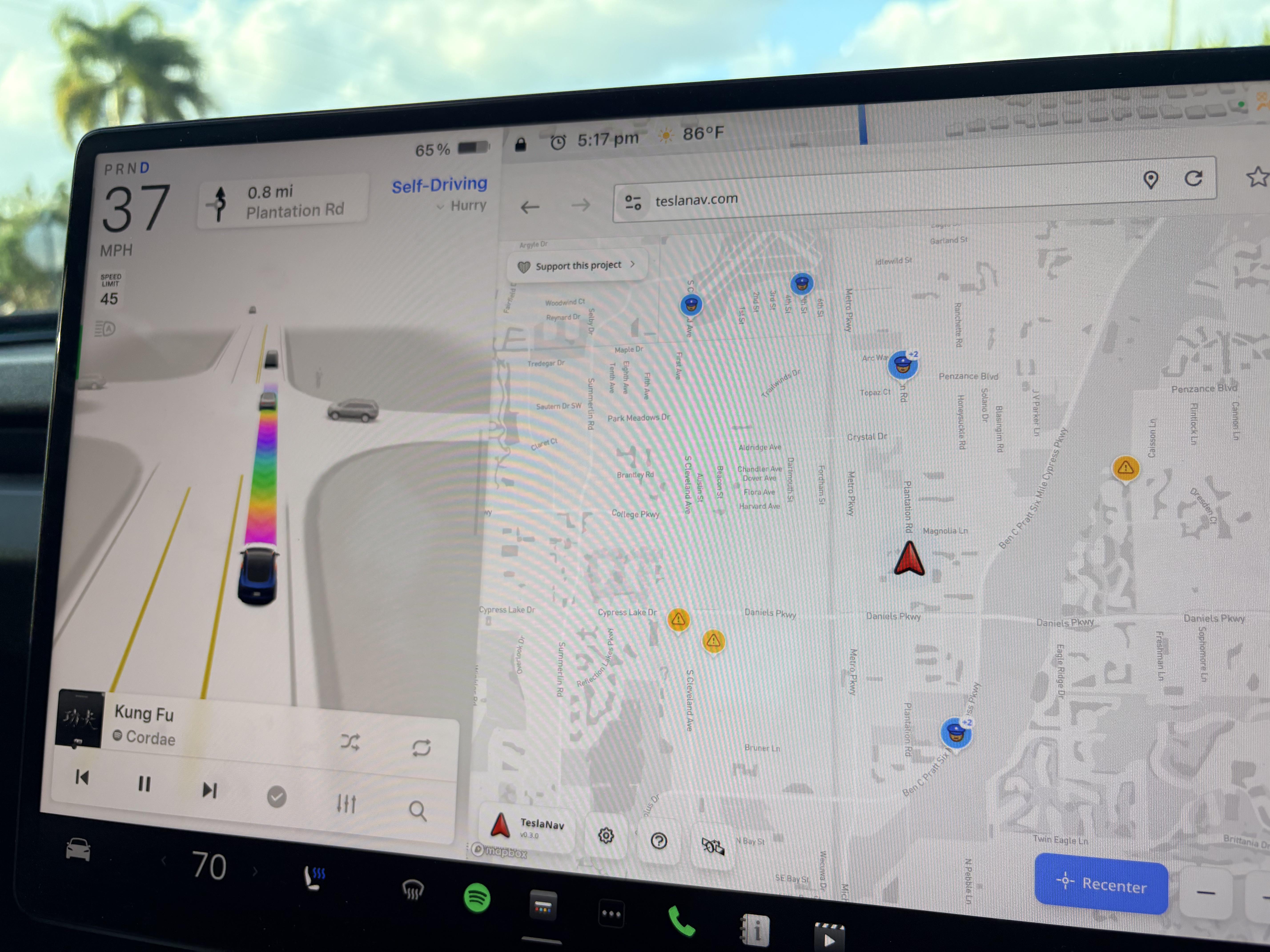
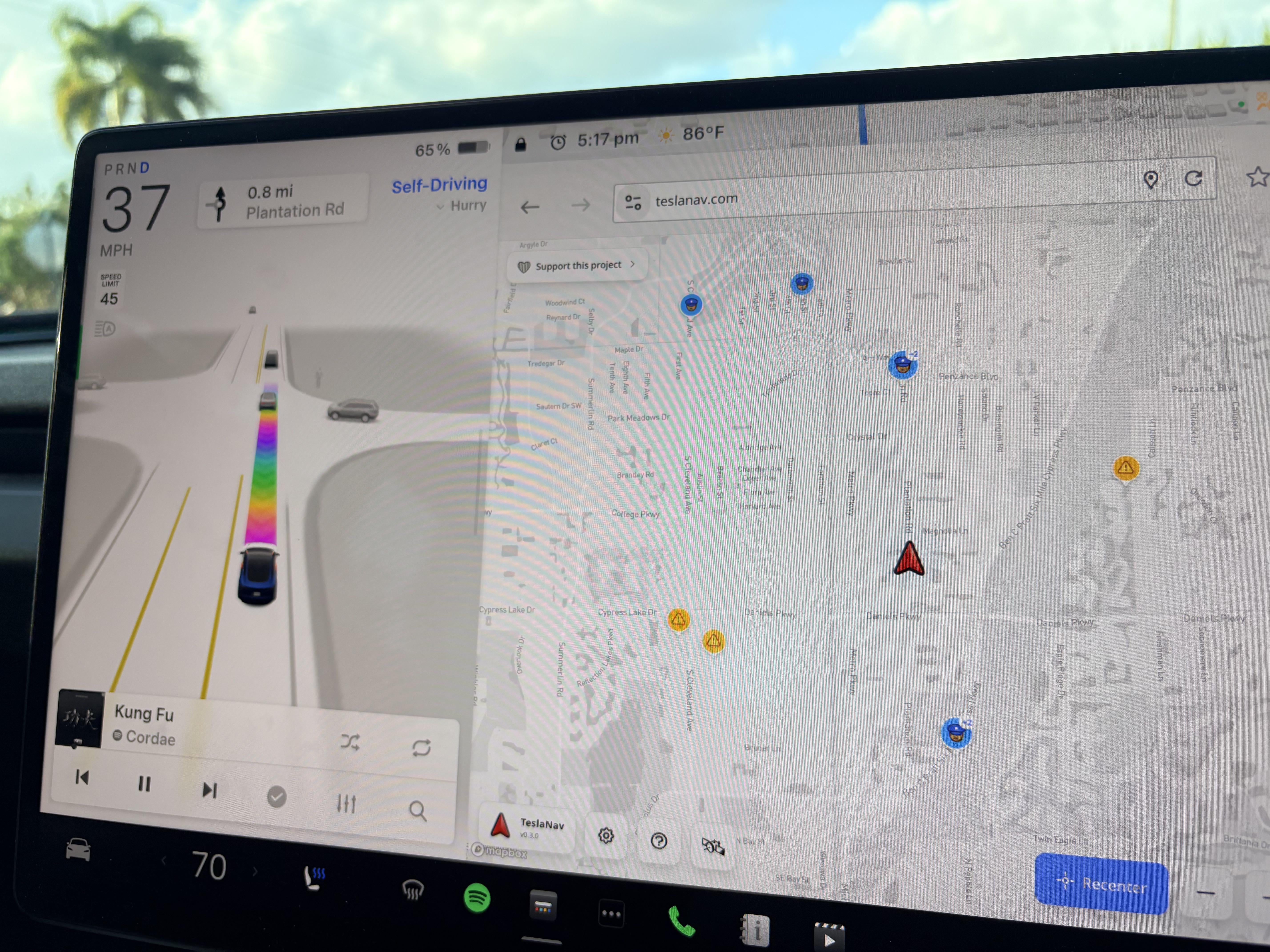
Late_Description3001
2026-03-06 22:28
Life changing thanks will try at next opportunity
Fit_Act_1235
2026-03-06 22:30
/u/Consistent_Set_8145 is the creator!
Happy_Dots
2026-03-06 22:35
Crazy! I was just thinking that we need this in the tesla native navigation. I'll be using it for sure. I'd like to see real time police data.
drewfussss
2026-03-06 22:36
Saw this a while ago… but do I want to give someone else access to my cars location?
theAerialDroneGuy
2026-03-06 22:43
woah that is amazing!!!!! Thanks for sharing
MarcBelmaati
2026-03-06 22:52
That’s actually so awesome, every time I drive my dad’s Tesla I just run Waze on my phone because I don’t like the built in navigation but this seems much better.
Street-Candidate4333
2026-03-06 22:55
Yea stumbled across this about a month ago, it’s my go to now for my daily commute. I love the blue and red screen flashes for police alerts the most.
1991Syclone
2026-03-06 22:56
Anyone else find the Tesla browser is garbage and crashes if you try to go to any remotely complex website?
spaceman_sloth
2026-03-06 22:57
I've tried a few times in my 2019 model 3. Crashes the browser every time
HUT2Moon
2026-03-06 22:59
I wish I could tie it to FSD because Tesla maps suck.
Curious_Gaandu
2026-03-06 23:11
This needs premium connectivity right?
[deleted]
2026-03-06 23:11
Yes
Rumpelforeskin6969
2026-03-06 23:15
Can you not just use Waze in the web browser?
Normal-Sir-7446
2026-03-06 23:16
This
formhault
2026-03-06 23:16
Or... an active Wi-Fi connection, like your phone's hotspot?
diaperpoop_
2026-03-06 23:16
You could probably use your phone as a hotspot to get around it.
mrdirectnl
2026-03-06 23:26
I don’t know? I have never tried it. You?
Rumpelforeskin6969
2026-03-06 23:26
Never thought about it. I’ll try it next drive
StormTrpr66
2026-03-06 23:28
Very cool!
I've just been opening Waze on my phone and placing the phone in the charging cradle below the main display. Doing it this way also lets me compare between what Waze and Tesla's nav are doing. I can still see Tesla's nav but also police alerts and other stuff Waze shows.
Surprisingly, I've found that Tesla's nav sometimes identifies traffic building ahead and reroutes before Waze figures it out. I thought I would be unhappy with Tesla's nav but it's not that bad.
FordGT2017
2026-03-06 23:39
I just use normal Waze in the browser. But I’ll try this as well.
Aromatic-Border4939
2026-03-06 23:51
I was parked right next to a cop and they didn’t even show on the map
SubieSTI360
2026-03-07 00:00
Tesla Nav can't find my house. Which to be fair. Because of how my street is. It confuses all gps systems. But what really surprised me is that it doesn't correct itself like Waze or Google would. A few times I ignored Ii because it was wrong. Get in my garage and it's still two streets over giving me directions.. I hope they fix that.
SubieSTI360
2026-03-07 00:02
Saw this on a YouTube video earlier today. I'm gonna try it here in a few minutes!! I need my cop finder!!!
ponko69
2026-03-07 00:05
Well, you should mark them in that case. It’s not like Waze users are putting tags on cop cars 😅
spazzvogel
2026-03-07 00:13
My 2018 M3P would crash/hang with piss poor browser repeatedly, but very cool.
FunnyOneJC
2026-03-07 00:16
Curious to what everyone uses the browser for? I have never used it.
PM013
2026-03-07 00:41
Thank you both👏👏
Cant_Pickaname
2026-03-07 00:44
Browser basically broke a couple versions ago on Intel cars. My 2018 did the same thing.
queenikhaleesi
2026-03-07 00:45
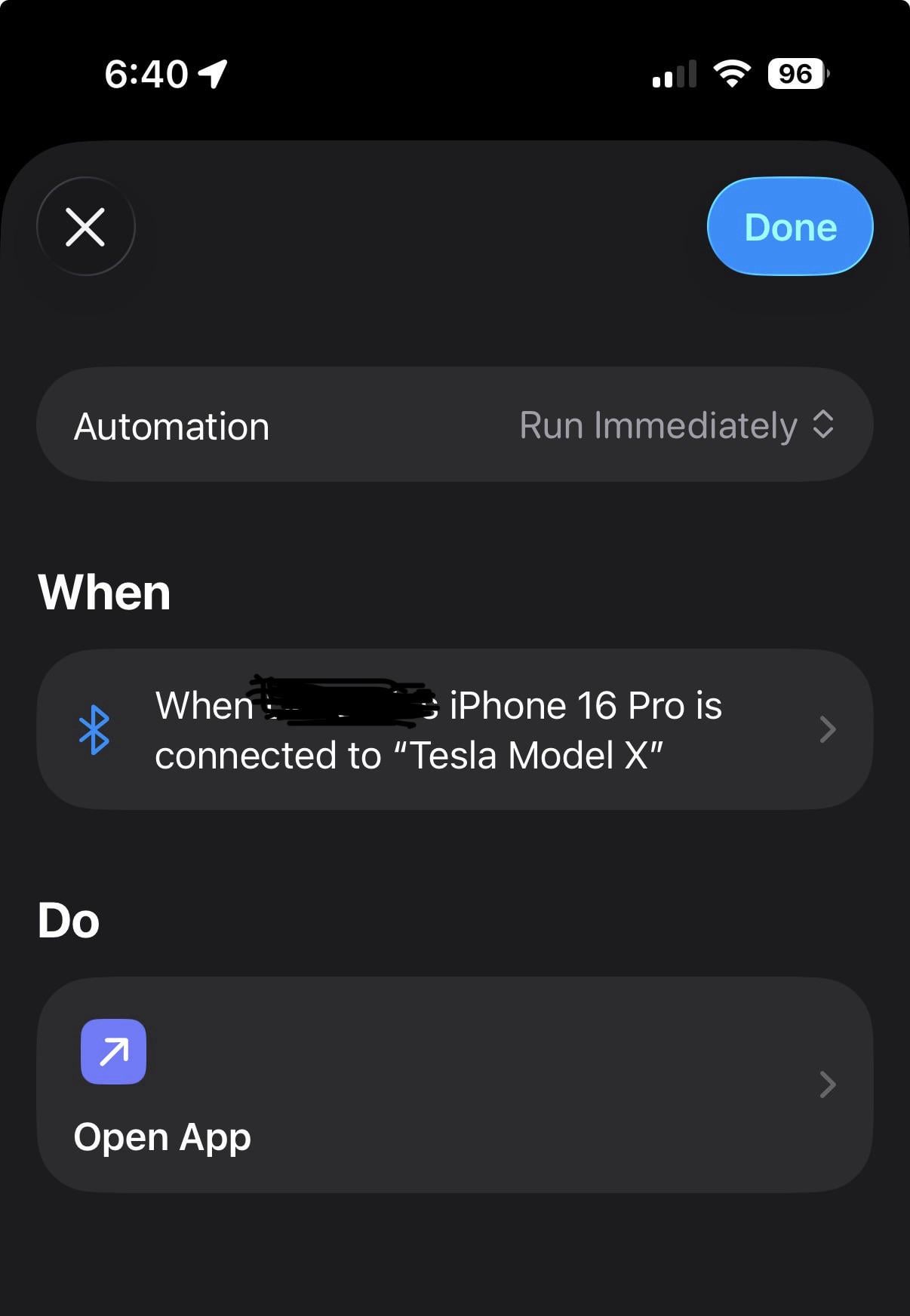
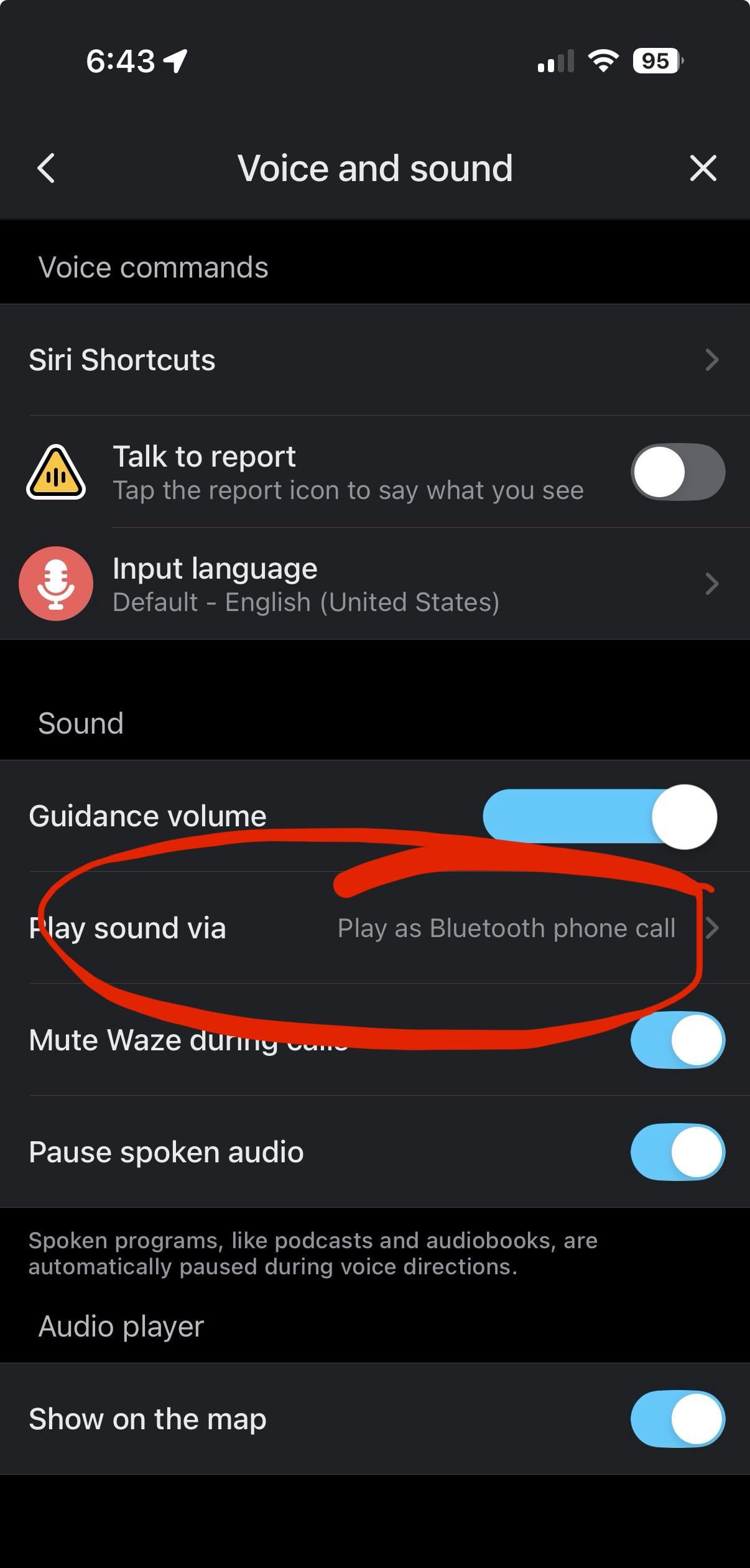
Same! I have an iPhone and made an automation shortcut to open Waze whenever my phone connects to my X’s Bluetooth. I also updated Waze settings to play through the Bluetooth to get all Waze notifications on my speakers.
Background-House9795
2026-03-07 00:46
I’ve been using an old iPad running Waze tethered to my iPhone. It’s mounted under the car’s monitor. And if desired I can Bluetooth music from my plex server to the Tesla.
Cant_Pickaname
2026-03-07 00:47
Is it better than teslawaze?
Dr_Pippin
2026-03-07 00:54
Try teslawaze.azurewebsites.net
Works for a while in my ‘18 and ‘19 Model 3s before crashing and having to be linked to again. Hit or miss how long it lasts for, but usually I can get my 15 minute commute before it crashes.
Dr_Pippin
2026-03-07 00:54
Try teslawaze.azurewebsites.net
Works for a while in my ‘18 and ‘19 Model 3s before crashing and having to be linked to again. Hit or miss how long it lasts for, but usually I can get my 15 minute commute before it crashes.
Dr_Pippin
2026-03-07 00:55
The older ones are definitely resource-limited and will crash readily. Don’t know how the new ones are.
Dr_Pippin
2026-03-07 00:55
You should read about how Waze works.
Dr_Pippin
2026-03-07 00:55
Try teslawaze.azurewebsites.net
Works for a while in my ‘18 and ‘19 Model 3s before crashing and having to be linked to again. Hit or miss how long it lasts for, but usually I can get my 15 minute commute before it crashes.
r1ght0n
2026-03-07 00:55
Use this to with every drive! I’ve even added a cop on my phone app and it popped up on the site within a few seconds….
Highly recommend this site!
Cant_Pickaname
2026-03-07 00:56
Teslawaze is actually what I was talking about with the browser. Good enough to take a peek for cops. I never got a chance to try this new one on Intel. Ryzen is fantastic.
no-tenemos-triko-tri
2026-03-07 01:01
I love my Google Maps on my Tesla. It's one of the reasons why I bought it. Never changing for nothing.
korean405
2026-03-07 01:16
Can you put in a destination in on the Waze using the browser just like a normal map?
Quirky-Weakness-9751
2026-03-07 02:11
Great song
triangulum33
2026-03-07 02:18
Been using it for a few months and it's great. Wish Tesla integrated this functionality.
OwnQuestion4
2026-03-07 02:21
There’s no way to enter an address it truly sucks.
StinkyChupacabra
2026-03-07 02:24
No alerts
StinkyChupacabra
2026-03-07 02:24
No
StinkyChupacabra
2026-03-07 02:25
Teslanav is about it for me
whadzinaname
2026-03-07 02:36
It’s for people who like Waze. Waze already knows their location, so this is no different.
4kVHS
2026-03-07 02:52
They won’t fix anything unless you go to MapBox and report it.
drewfussss
2026-03-07 02:56
I love Waze…. But it’s not Waze.com…
whadzinaname
2026-03-07 02:58
Oh I see, you mean the developer. I get it.
SubieSTI360
2026-03-07 03:37
Omg. What is that and how do I do it. I made a whole thread about this and nobody replied. It did it again tonight. There has to be a way for me to correct the route. Please help! Lol
onfire4g05
2026-03-07 03:49
I use it for a Home Assistant dashboard...
Has my garage door opener, house lights, HVAC controls, some outdoor camera stills, door statues, alarm controls, etc.
Faile-Bashere
2026-03-07 03:54
You just make edits on MapBox.com (like where the streets are, which ones are one way, etc) then submit them for review and an admin can approve the changes.
SubieSTI360
2026-03-07 03:57
But I'm using Tesla Nav.. not sure if it uses one of those as a backbone or it's completely separate.. but will Mapbox fix Tesla Nav?
Faile-Bashere
2026-03-07 03:59
Yeah. It should.
SubieSTI360
2026-03-07 04:01
Also.. all the streets are labeled correctly.. it's just how my street is. There are businesses behind me and then a main road. All nav systems can't handle it for some reason. Here's a picture with my house circled and the road behind it. You need to go on the road in red just out of the picture, turn right, then right again into my sub. Nav just can't do it.
https://preview.redd.it/c68eph1drjng1.jpeg?width=1744&format=pjpg&auto=webp&s=edeb0b8766c9a3f0d643252192a8ffd5d76ad6e4
SubieSTI360
2026-03-07 04:11
Thanks so much. At least I have something to try. Dang car can drive itself. But it can't find my house. Lol
vulcan_on_earth
2026-03-07 05:00
Developer knows when you are home … developer knows when you are not at home.
TheKrs1
2026-03-07 05:29
… and for road trips?
Dr_Pippin
2026-03-07 05:48
Either keep refreshing the webpage or leave Waze running on your phone.
dubie4x8
2026-03-07 06:18
This is the way.
Comm4nd0
2026-03-07 07:27
I’m going to try this
Mmm_bloodfarts
2026-03-07 07:31
Googling things i hear in podcasts, reading fishing magazines from way back and playing browser games while stuck in traffic, calculator, remote desktop when parked (it's like a phone but a bit worse but way bigger) weather, news and other browser stuff
Valaj369
2026-03-07 08:06
Good for short trips. When I do my weekly 4-5 hour road trip, it crashes after like 45 minutes in. Happened in both my '23 MYLR and '24 MYP. For those trips, I ended up going back to using my phone.
PackExternal3757
2026-03-07 09:20
Needs to be for fsd Tesla default maps suck
THATS_LEGIT_BRO
2026-03-07 09:23
YouTube TV when my wife is shopping inside TJ Maxx
THATS_LEGIT_BRO
2026-03-07 09:24
They know if you’ve been bad or good.
docwood2011
2026-03-07 10:29
You can watch YouTube TV from within the YouTube app in the entertainment section just go to the left bar on YouTube and you can find it there 🤘
THATS_LEGIT_BRO
2026-03-07 10:33
WHAT!? TIL
lookin4points
2026-03-07 11:04
Remove this photo you are doxxing yourself takes two seconds for someone to now find you in future comments/posts.
jk9081
2026-03-07 11:17
Tried to communicate and never responds back.
dbv2
2026-03-07 11:34
Wow - that is really cool. How would I do that?
carfo
2026-03-07 11:41
Now it just needs to integrate with FSD
H3xify_
2026-03-07 11:41
I’m a day trader, so I use it to look at charts when I’m charging lol
queenikhaleesi
2026-03-07 11:44
It’s an automation in the iPhone Shortcut app, here’s a screenshot of mine.
https://preview.redd.it/ax88tngk1mng1.jpeg?width=1206&format=pjpg&auto=webp&s=c057170a1bdad46b07f59140cb992a78d6ce6131
queenikhaleesi
2026-03-07 11:45
And here’s where to update Waze.
https://preview.redd.it/v4gyimq22mng1.jpeg?width=1206&format=pjpg&auto=webp&s=3ba9d71c3eb3f3ae7e37d555cc3d118000edc40b
dbv2
2026-03-07 12:10
Thanks - so will I have to unlock my iPhone to get this to work? For some reason I am having trouble creating the shortcut. I think I create the shortcut, then select Bluetooth, but then don’t see Tesla Bluetooth. Sorry for asking so many questions, but have not created many shortcuts. Googled it, but don’t see an easy answer. 🙂
queenikhaleesi
2026-03-07 12:20
Yes, your phone needs to be unlocked for the automation to run. You should have your car listed in your Bluetooth device list, names would be something like this: 🔑 Model X
scrytch
2026-03-07 12:33
If only the web browser could be “used” while driving in Australia - then these things would be useful.
dbv2
2026-03-07 12:34
Thanks again. Figured it out with your help. Awesome! 🙂
queenikhaleesi
2026-03-07 12:40
I'm so glad it worked for you, it's a game changer!
SubieSTI360
2026-03-07 13:16
Sure, someone "could" but why? I posted a pic of my car with my license plate showing the other day and someone said the same thing. I'm not posting nasty comments... It might be naive, but I just don't care. Heck, I'd post my birth certificate if someone could help me fix my Nav issue.. lol
BoechtVanDunaldy
2026-03-07 14:07
On wifi? Or is your HA running through proxy? Can't seem to open my HA server even when connected to wifi
onfire4g05
2026-03-07 14:08
Mine is public going thru Cloudflare, so I can access it anywhere.
FunnyOneJC
2026-03-07 14:19
It was hidden in plain sight all along lol 😝
dookiewater
2026-03-07 14:49
Are you me?
Head-Soil-5101
2026-03-07 15:08
If it only could pick efficient routes. Driving to a destination, the route will pass turning on a road to go to the next block turn right followed by another right putting the car on the road it simply could have tuned left on. I have also noticed the car doesn’t necessarily follow the route. So confusing sometimes.
Faile-Bashere
2026-03-07 15:41
So to confirm from the red street at the top, would you take a turn south into the parking lot to get to the red circled house? Trying to understand the proper way to get there. Also, if you DM I can try to assist privately. I’ve made some street changes before in mapping software near where I used to live.
StormTrpr66
2026-03-07 15:51
I'm not sure but I think that would be due to the maps and navigation, not the actual FSD. Doesn't FSD just follow what the map tells it to do?
1DarkDD
2026-03-07 16:47
Does it work with fsd?
B1A23
2026-03-07 17:05
Browser and theater were borderline unusable on my old Intel M3. The Ryzen one I have now is much better.
mx20100
2026-03-07 17:25
I hope Tesla will at some point allow different apps for navigation. Specifically Waze, sygic and TomTom
Strong-Shape4813
2026-03-07 18:35
Why can’t I enter an address anywhere on this?
pefman
2026-03-07 19:16
tried it, crashes on my m3 2021 (cries in intel atom)
Texmex865
2026-03-07 20:19
Just found that today on my 8 hour trip. VERY helpful. However, FSD seems sort of broken right now. Swerving all over the road, phantom speed limit signs, etc.
Optimal-Vermicelli50
2026-03-07 20:34
Needs to be incorporated into regular Google maps in the regular Tesla nav... Google owns Waze already so....
IIAIronWolf
2026-03-07 23:01
That’s just a webpage. Tesla is still way behind on app support and this isn’t official Waze.
redditname8
2026-03-08 00:14
I am so excited about this! I use Waze everyday!
JustSayTech
2026-03-08 01:11
Way behind? They never said they planned to support Waze or that that type of integration was part of thier plan.
pdom10
2026-03-08 01:19
I can’t get it navigate what am I doing wrong lol
paladin_NA
2026-03-08 01:39
I tried this today, but I'm not sure how useful it is given how often the map refreshes to stay up to date. For example, if a car one minute ahead of me reports a police officer, will that show up on my map immediately, or do I need to refresh it manually?
Zealousideal-Exit749
2026-03-08 04:42
Wow!
Mundus09
2026-03-08 05:46
Can we update the screen? My 2021 m3 screen feels like its powered by a Samsung Galaxy S3 sometimes. I'd strongly consider upgrading if it would accept a newer version screen, I think the 2022 introduced new hardware, or even better would be to use the highland screen.
Ps: I say "screen" but I mean the entire unit, since to my understanding the actual logic board for the screen is in, well, the screen! Like an iPad, except from 2010.
WaffleHouseCEO
2026-03-08 05:48
Oh damn this is great.
Aromatic-Border4939
2026-03-08 06:00
Are how about you just tell me how it works
Dependent_Newt_8846
2026-03-08 06:48
I wish we could do this in Australia. We can't use a Web browser while driving
Dr_Pippin
2026-03-08 13:22
This right here is part of the brain rot being caused by social media.
freestyleloafer_
2026-03-08 13:54
Holy shit!
freestyleloafer_
2026-03-08 14:01
Same. In my case it's kinda dangerous because Tesla Nav gives up and declares it's job done in the middle of a turn at the edge of my property. I don't understand why it wouldn't just go into AP when the tech knows the vehicle is still on the road and the pin for my desired location is another quarter mile down my driveway.
I have seen on some of these forums folks talking about geofencing for their specific parking spaces at home. Might that help you?
agonyou
2026-03-08 17:09
Why not do Waze on the browser
SubieSTI360
2026-03-08 17:19
My car does that too. I've tried setting my home using my garage and different points of my driveway using both "current location" and dropping a pin and tapping that pin to set home. If it finds my house at all using FSD. It usually pulls up to my front curb. ONE time it pulled into my driveway. Another time it pulled into my neighbors driveway two houses away. It can't do it. 👎
IcyFly521
2026-03-09 00:10
Sweet
IcyFly521
2026-03-09 00:10
How do you like your Tesla in general
Chaos744
2026-03-09 01:23
I never got it to give me actual alerts.
SirLlama123
2026-03-09 05:10
tried it in my 2017 s but no luck.
SirLlama123
2026-03-09 05:11
this here is why society is doomed to fail 😢
Chamiman
2026-03-10 14:31
It seems great, hopefully the dev will make navigation work and sort crashes out.
Worried_Ad_1288
2026-03-10 16:08
no need to be mean
formhault
2026-03-10 16:46
Lol 😁
sonofabraham1
2026-03-10 17:03
Still have no idea how to input the destination address on that.
mosso2000
2026-03-12 18:11
can you share the shortcut, please?
queenikhaleesi
2026-03-12 18:26
Yes I shared a screenshot further down in this thread: https://www.reddit.com/r/TeslaLounge/s/bfK118G3dZ
TupacFR
2026-03-13 14:44
How to input an address?