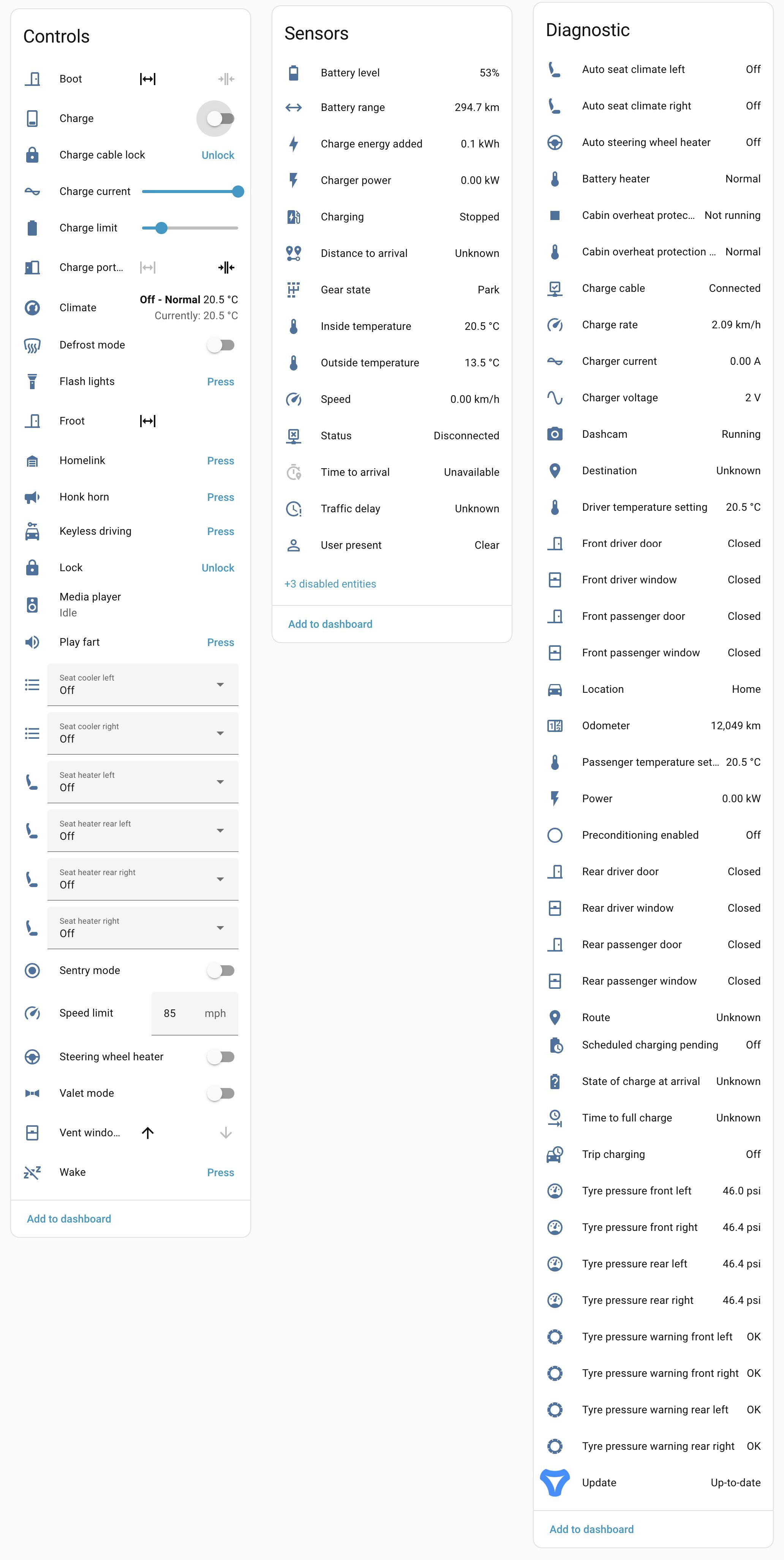
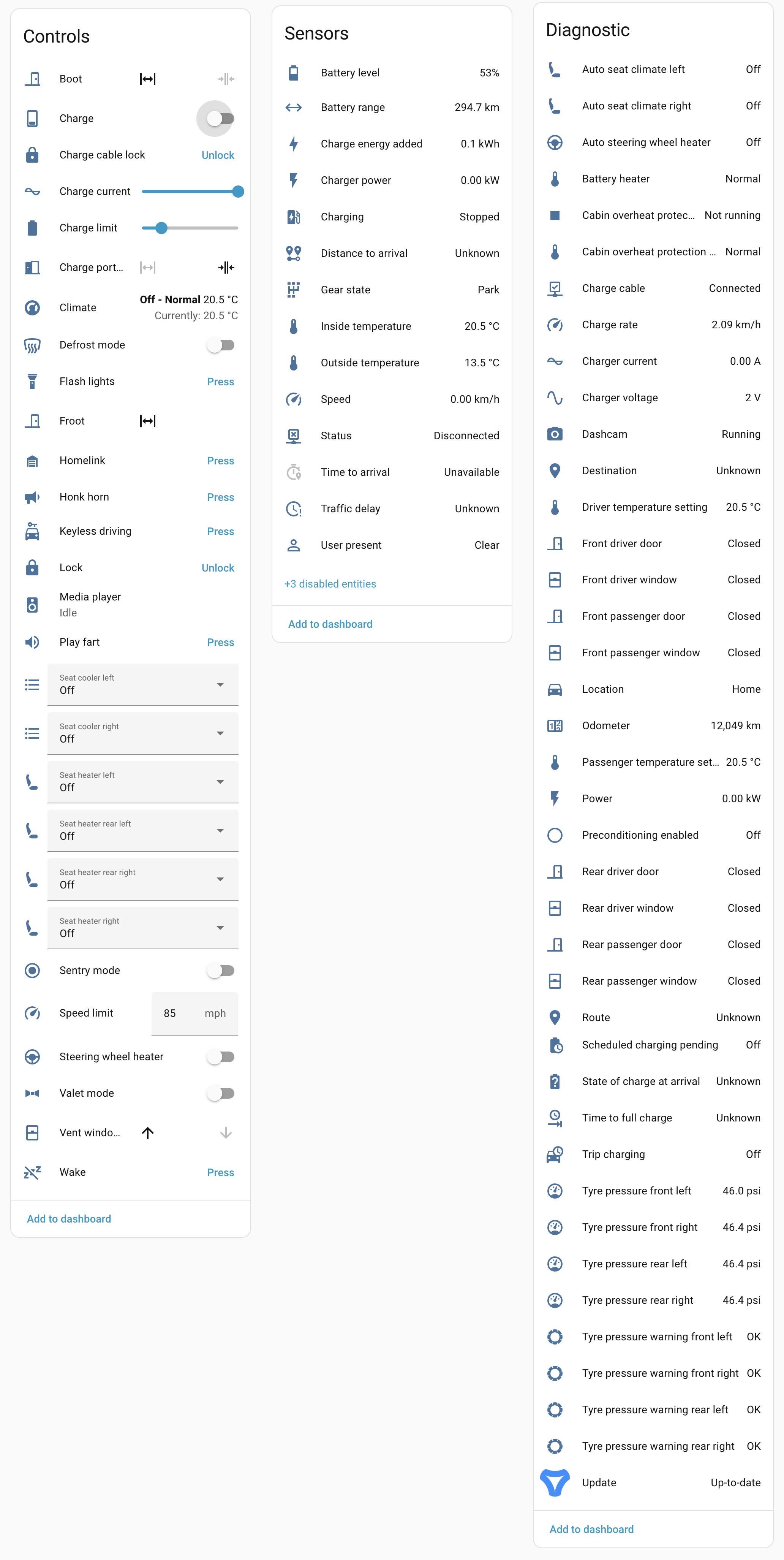
oasacorp
2026-02-24 17:41
If you have tessie is the integration paid?
oasacorp
2026-02-24 17:41
Looks super cool. What exactly are you trying to achieve here? Any automation you have in mind?
HouseConcentrate
2026-02-24 17:50
Interested in reply here as well
RealWorldJunkie
2026-02-24 18:30
The integration isn't an additional payment. It works free with any Tessie subscription or outright ownership I'm planning to have my car for a good few years so just got the lifetime membership of the base package..
Various things. I'm hoping to plan some more in-depth cool things but in the last day I've set up the following:
Automations:
* I'd added a physical button next to my front door.
* A single press as I'm walking out the door unlocks the charge port (Due to where my car is parked, I'd have to walk up a flight of steps and literally walk all the way around the car to use the door handle thing, and even then you have to wait a few seconds and open and close the door. This I can press on my way out and by the time I reach the charger, it's unlocked.
* A double press starts the climate and heats up the car
* I'm deciding what action to assign to a long press on it
* An automation runs when the car is not at home, and is navigating to home, when it shifts into drive at the beginning of the journey, it will look at whether my wife or I are near the car, and if only one of us is (therefore assuming one is driving and the other is elsewhere) it sends the other person a notification giving them an ETA for getting home.
* Sends me a notification if the car has been parked at home for more than 3 hours but hasn't been plugged in
* When the car pulls into the drive, turn the outside light on, and keep it on until the front door (which has a door sensor on) opens and closes, then turn it off again
* If navigation destination is set to the a Home Assistant zone, in which my wife or I are currently located (presumably meaning the other person is driving to pick them up), it sends them a notification with an ETA, then a follow up notification on arrival (I need to test this one properly still)
* Alerts for if doors, windows, boot, or frunk are left open whilst neither I nor my wife are near the car (I know there are basic versions of this built into the app, but I've found it can wait WAY too long to let you know, so this has a shorter grace period).
* If windows were left to vent, and rain is forecast for the local area, close the windows
* An automation I have set but will just turn on when I have specific friends coming over, if someone presses the doorbell, the car farts,
Dashboard Integrations:
* On my HA general overview page I have the following always visible:
* The cars location added to the general map as well as mine and my wifes
* I created a card which displays where the car is in simple text. If it's located within a defined Home Assistant zone, it states that name, if it isn't, it uses the lat-long data, cross references it against a map, and displays the street and town name of where it's located.
* If the car is in drive mode, it will also display the cars heading (in North, North East, East... etc) and if navigation is being used it will also include the destination
* The cars battery level
* On my overview page I also have the following cards that are have conditional visibility:
* If the car is actively charging, it will show what the charge limit is currently set to (which upon clicking I can change), and the time left until the charge limit is reached.
* A card displaying the lock status of the car, the boot and the frunk. This only shows if one or more of them are not closed/locked
* If the car is in drive mode, it's live speed will be displayed
* If the car is navigating somewhere, it will display the destination, the time to destination, and the estimated state of charge on arrival.
* On a car specific dashboard page:
* I have various things always visible:
* A more advanced version of the dynamic location text card I mentioned before
* State of charge
* Estimated range with current battery level
* Lock, boot and frunk status
* Set charge limit
* Tyre pressures (with visible alerts when dropping below certain levels, with different levels set for different times of year)
* The exterior and interior temperatures, the climate temperature setting, and a button to turn on and off the climate
* Sentry mode on/off display/button
* I have the following with conditional visibility:
* If the car is actively charging it will display charge limit and time until charge limit is met
* If the interior temperature is over a certain temperature it will display controls to turn on/off the seat coolers for driver and front passenger seats
* If the interior temperature is under a certain temperature it displays controls to turn on/off the heated steering wheel, drivers seat and front passenger seat (I rarely use the rear seat warmers)
* The other variable visibility cards from the Overview page
I plan to set up an eInk display by the front door that displays things like the cars battery level, temperatures, etc, so you can see things at a glance whilst getting ready to go out, and include some physical controls to easily adjust them.
There's definitely potential for more interesting and involved automations, but it's been less than 24 hours since I set this up so early days yet.
RedFive_1138
2026-02-24 18:36
My favorite: turn on my home's HVAC whenever Tesla GPS is set to "home"
RedFive_1138
2026-02-24 18:38
I also have a HA Car Dashboard where I track the miles / time since tire rotated, wipers replaced, break fluid checked, etc. etc. Being able to tap into the miles is awesome for tire rotation reminders.
RealWorldJunkie
2026-02-24 18:45
Oh, forgot another automation:
* When navigation destination is set to Home, when the time to arrival reaches 30 minutes, if the temperature at home is below a certain temperature, it will turn off/on certain radiators in certain rooms (depending on the time of day) and then turn the central heating on.
RealWorldJunkie
2026-02-24 18:47
Ah yeah I forgot to add that to the list of what I set up. I have it set so if the destination is set to Home, when the time to arrival reaches 30 mins, if the temperature at home is below a certain level, it will turn on/off various radiators depending on the time of day, then turn on the central heating.
ipokesnails
2026-02-24 19:00
I've seen a few comments on Reddit about unlocking the charge port with other features like Enhauto's S3XY commander and pulling the door handle, but can't you just unlock the charge port by pressing the button on the connector?
MTMTE
2026-02-24 19:17
I'll chime in with some of the automations I created using the "free" tier *Tesla Fleet Integration* and other free integrations in Home Assistant:
* On my car I DISABLED the "Exclude From Home" setting of Sentry Mode so Sentry will stay on in my driveway but that means it will also stay on in my garage. I have Home Assistant turn off Sentry Mode if it determines that my car is in my garage based on its distance from a Bluetooth proxy Sensor looking at the Bluetooth iBeacons the car spits out.
* Similarly I *do* have the "Exclude From Home" setting ENALBED for the Door Locks but the Tesla GPS is not accurate enough to determine that if my car is on the street in front of my house (or in my driveway) that it should probably lock the doors as if it were "not home". So again Home Assistant will lock the cars doors if it determines its "home" but *not* in the garage.
* Unrelated to the Tesla Fleet Integration I simply have Home Assistant track the car's Bluetooth iBeacons to close my garage door automatically when I pull out of my garage and the estimated iBeacon distance meets a distance threshold; conversely I have a NFC tag that I can just tap my *unlocked* phone to and it will open the garage door if the car is near (no need to pay for *MyQ*).
* I have Home Assistant send me a notification at 9PM if the car is not on the charger (you can actually do this with just the *Tesla Wall Connector Integration*) or if it is was Charging but has stopped charging before reaching the current set Charge Limit (since there are times someone in my house will swap it to another car prematurely...a lot of times its me who does it I found out).
* Lastly I have a super over-engineered Automation for setting and managing the Charge Limit: I don't drive a ton and like to charge during off peak hours - I also like to keep my battery at 55% during the week and 80% Friday thru Sunday. Previously I would set the Charge Limit to 80% at 12:01AM Friday morning and 55% at 12:01AM Monday morning but I found that a lot of the time come Monday morning if I didn't drive much during the weekend the battery would still be at around 65%-75%. Not really a big deal but as the Charge Limit was now back down to 55% the Battery would just slowly lose whatever extra charge it had running generalized background functions on its way back to 55%. So now I have Home Assistant set the *Charge Limit to whatever the current Battery Charge State* is every night at midnight to not "vaporize" a bunch of electricity that was sent into the battery. Again- *totally over engineered* but I plan and keeping my Model 3 until it rots and want to keep the battery as close to 55% as much as possible (from what I've read at least).
Home Assistant addiction is real.....
oasacorp
2026-02-24 19:24
Thank you for the full write up. Veey interesting and i can see why you did all that. I fully understand the addiction. Way back in 2010 i remember using tasker (with android) to automate the simple task of over engineering switching on/off wifi and switching on mob data as efficient as possible to conserve battery power.
I think based on the use cases tou listed, i am gonna sit out.
For me exclude home works well and i manage the charge limit through inbuilt settings.i dont have a garage so no need of the opener. But if i had i might go the rfid route or number plate. Haha.
MTMTE
2026-02-24 19:30
Admittedly there was some things I was super excited to do that just... didn't really pan out in actual application.
For example: I wanted to put a NFC tag under the Frunk so I could tap my phone to open it quickly.
But because the commands are going through the Internet and Tesla's API if I tapped my phone it would have to wake the car which can take nearly 30 seconds and then send the command that can take another 5 seconds ...and by that amount of time it was easier to just open the door and open the Frunk from the screen (or a S3XY Button or via Bluetooth in the Tesla Android app Notification).
DeathBlade94
2026-02-24 19:39
I love havjng our cars in home Assistsnt. There are some data points I wish was available in either integration but better than most other cars in terms of what is available.
MTMTE
2026-02-24 19:39
>I have specific friends coming over, if someone presses the doorbell, the car farts,
Ah, a man of culture I see.
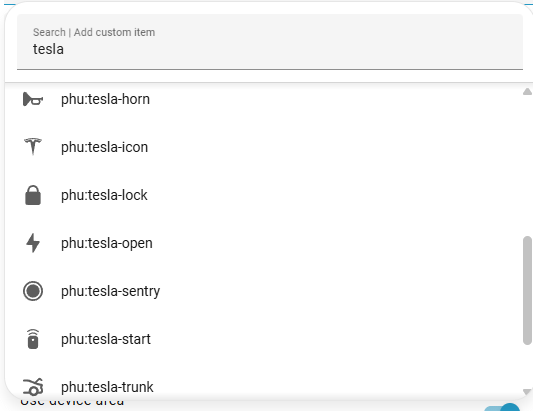
These are great. You might already be aware but the HACS Integration "[Custom Brand Icons](https://github.com/elax46/custom-brand-icons)" includes all the Tesla icons. So for example you could use the real-deal Sentry Icon in Lovelace Dashboards (even coloring it read in things like headings when its active etc.).
https://preview.redd.it/va7ureehwhlg1.png?width=533&format=png&auto=webp&s=05a54d74e7c7e587191f65006f6796ef4cfe7e60
RealWorldJunkie
2026-02-24 19:57
I have a S3XY commander. The Tesla built in feature was taken from them, but unlike with the stock S3XY one that can only work with the rear left door handle, the S3XY one can work with any door handle.
However, because of the design of my raised drive and the relative position to the front door, I can't access any door handle without walking in the opposite direction of the charge port and walking up a set of stairs, which is arguably much less convenient than just taking my phone out of my pocket which I've been doing for the past 14 months.
As for the button on the charger, that only exists on official Tesla chargers. If you have any other charger, that button doesn't exist.
RealWorldJunkie
2026-02-24 19:58
Ooh I was not aware of that, that's great to know, thanks very much!
ipokesnails
2026-02-24 20:03
Ah, that makes sense.
I'm only using Tesla chargers, I wasn't aware that others didn't have the button.
AutoModerator
2026-02-24 20:04
https://sh.reddit.com/mod/teslamotors/wiki/teslachargingrecommendationsbatteryhistory
*I am a bot, and this action was performed automatically. Please [contact the moderators of this subreddit](/message/compose/?to=/r/TeslaLounge) if you have any questions or concerns.*
ThisIsCountry
2026-02-24 20:04
The Tessie integration is great, I have a button in my kitchen that starts climate as well as a button in my garage that opens the frunk conditionally based on the car's location.
RealWorldJunkie
2026-02-24 21:56
Just in case you didn't get notified from them, thought I'd let you know there's been quite a few replies to this post now and I've added a break down of my current uses in the original post body.
RealWorldJunkie
2026-02-24 22:05
Ah unfortunately I've discovered that these don't work on the iOS app. I changed several icons to the ones from this, and they work fine in browser, but when accessing it from the Home Assistant app, there's just no icon shown at all. Shame, but thanks for the tip anyway.
MTMTE
2026-02-24 22:15
Hmm I will admit I am not on iOS but I don't recall seeing any incompatibility with iOS outside of "Widgets".... and there are for sure Forum users that are using it for iOS.
I know sometimes you have to kick it to "reload the cache" before icons start displaying.
On Android that can be done by going to Settings>3 Dots> "Check for updates" and then "clearing the App from memory/recent apps and/or rebooting the phone phone".
Not sure what the process would be on iPhone?
RealWorldJunkie
2026-02-24 22:29
Hmm I did wonder if it was something like this. Will take a look tomorrow, thanks again, really appreciated.
VIPGENIUS
2026-02-25 02:20
HA is great I use it also for many data and automation for both of my Tesla
VIPGENIUS
2026-02-25 02:24
Button on charger works but key/phone has to be in proximity of car, card doesn’t work unless put to sensor. another thing some chargers don’t have buttons
314159265389
2026-02-25 04:00
As a total complete naive person to home automation, reading this post is wild what you can do.
Wow.
Writing_Particular
2026-02-25 05:32
Very nice - gotta get more familiar with Home Assistant!
cyberden91
2026-02-25 10:39
What do you find is missing ?
I want to buy a new car and one of the reason I will go Tesla is Teslamate and HASS integration which is really weird for most people lol
Blazah
2026-02-25 11:41
Can we get it to roll up windows if rain is coming/detected with just the stock standard system?
RealWorldJunkie
2026-02-25 12:37
What do you mean by the stock standard system? Do you mean without home assistant or any 3rd party integration?
No I don't believe that's a feature in the official Tesla app, but you can absolutely set open windows to close just with the Tessie app, or a more involved automation using Home Assistant (for example, automatically closing the windows if rain is forecast for the local area, but only if the car isn't located at home (where it may be in your garage if you have one)
RealWorldJunkie
2026-02-25 14:18
Just an update, this was absolutely it.
Once I reloaded the front end cache all was great. Thanks again!
Baramin
2026-02-25 16:47
My use case : When I'm home, it sets max charge to 50%, as this is the minimum I can set it to (with or without HA) and I want to charge as much as possible at work
I also have an automation triggered when going above 30% charge, and stop charging immediatly. This way, when I go to work the next day, as I use about 10%, I start charging there around 20%
My HA also sets automatically to 80% max charge when I'm at work
HouseConcentrate
2026-02-25 17:10
Thanks bro. Damn you took this to new level. Congratulations!
RealWorldJunkie
2026-02-25 18:39
Haha no worries.
Early days yet but when you start falling down the Home Assistant automation rabbit hole, it becomes more than an addiction haha.
Over__Analyse
2026-02-26 05:27
What buttons are you guys using?
Over__Analyse
2026-02-26 05:27
What buttons are you guys using?
RealWorldJunkie
2026-02-26 08:17
[Aqara wireless mini switch](https://amzn.to/4swCFH5) I have loads of them all over the house, perfect for use with Home Assistant.
Small, battery operated (that lasts for years of daily use), and they can connect via Zigbee directly to home assistant if you get a Zigbee antenna.
Also they allow 3 functions (single press, double press, long press)
OkTransportation8325
2026-02-26 11:12
Biggest gap is refresh frequency causing some of these setups to fail
RealWorldJunkie
2026-02-26 11:28
All work perfectly for me,
Which do you see an issue with?
DeathBlade94
2026-02-26 16:16
I wish I could see pack voltage, temperature and manually trigger battery heating.
ThisIsCountry
2026-02-26 17:23
There are tons of options out there. I have a Zooz Zen37 in my kitchen.
cyberden91
2026-02-26 17:32
Yeah that's a fair point. Do you know other EV integrations that are more complete or just better ?
DeathBlade94
2026-02-26 17:41
Not that I know of. Idk why Tessie does not give me voltage or temp in the integration in home Assistsnt because the app has them. I have a s3xy commander that I can use for remote pre heating with one of their latest firmware updates but it only works if the car is unplugged and they told me thats by design which imho makes negitive amount of sense
DeathBlade94
2026-02-26 17:43
I do this. I also have it that if any of the two cars plus all personal phones leave a large geofence zone (about 2 hours radius) for more then 8 hours the house switched to “vacation” mode and when we return within the roughly two hour window that house returns to normal behaviors.
OkTransportation8325
2026-02-26 19:43
I’ve been trying things like open garage on arrival but refresh can be slow. Waiting around on arrival doesn’t make sense. Yesterday had a 10
Minute delay to capture location to home
I’ve got automations that manage battery control when charging EV but can be a 1-2 minute delay for the “charging” state to switch and trigger a change to settings. Doesn’t matter for that scenario but for things that need accuracy down to 2-3 seconds, I don’t know how much luck I’d have.