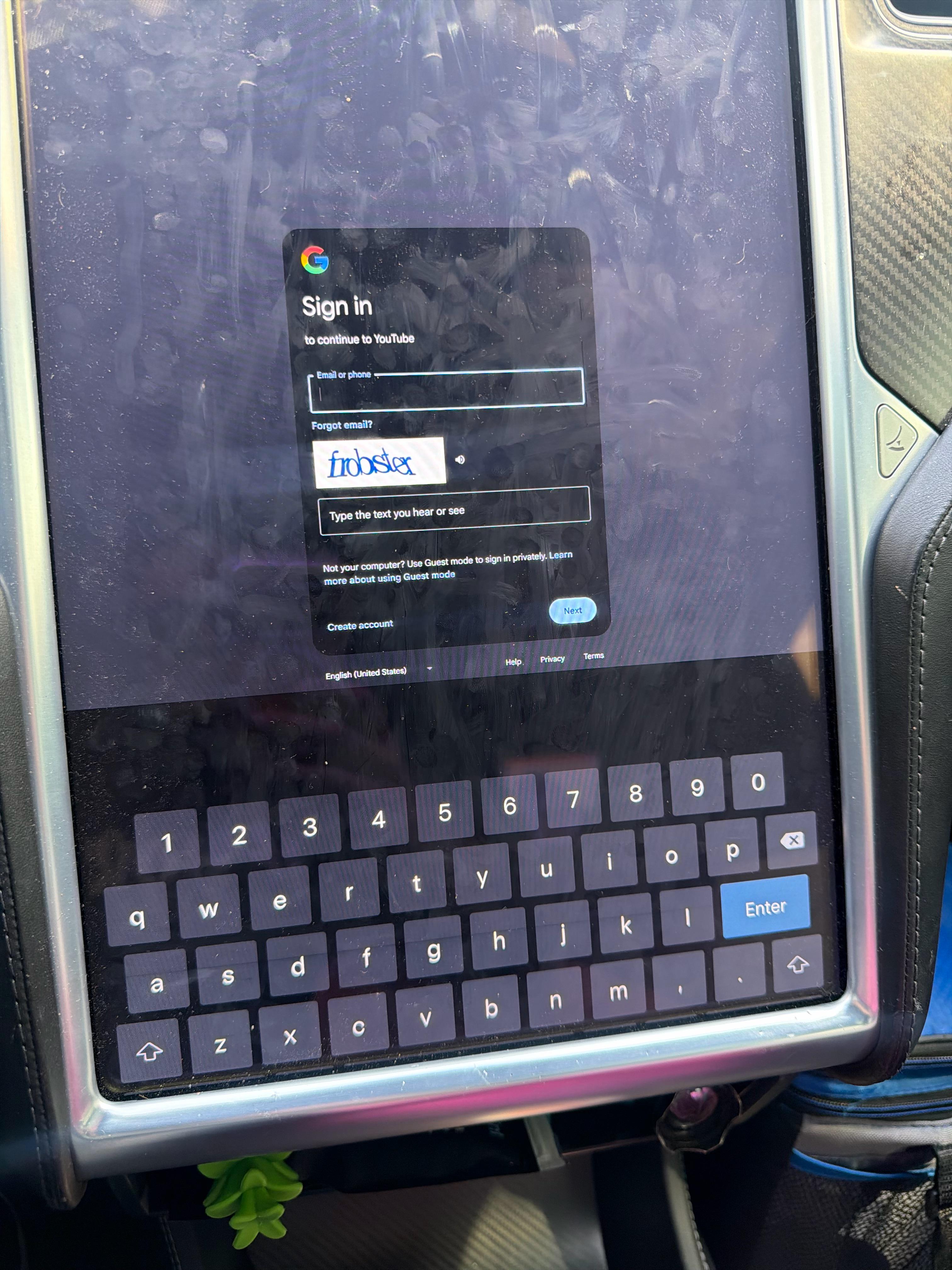
TC40093
2026-02-19 19:06
Use ur phone number instead
Firebirdflame
2026-02-19 19:08
If your email is gmail based, you don't the end.
i.e., if your email is [`example@gmail.com`](mailto:example@gmail.com) then you can just type `example`
rocker_01
2026-02-19 19:08
Fun fact: if your email is [abc.xyz@gmail.com](mailto:abc.xyz@gmail.com), just typing in [abc.xyz](http://abc.xyz) in the "Email or phone" text box will work
Freewheeler631
2026-02-19 19:13
What happens when you hit the shift button?
hawaiidesperado
2026-02-19 19:13
Shouldn’t shift change the numbers to special characters just like on a normal keyboard?
vanilladash
2026-02-19 19:14
It’s not doing anything unfortunately
vanilladash
2026-02-19 19:15
Thanks, but regardless I have an ! In my password so I can’t log in anyways 😂
vanilladash
2026-02-19 19:16
I have a ! In my password too 🤔
vanilladash
2026-02-19 19:16
Nothing it just does caps lock
BlueScreen64
2026-02-19 19:17
And as far as I know Gmail doesn’t count the . So it’s just abcxyz under the hood and can just type that.
vanilladash
2026-02-19 19:17
I got the email part, but I can type my password because it has a !
yardshark09
2026-02-19 19:19
Wonder if you could plug a usb keyboard in one of those ports. 😂
D9FS
2026-02-19 19:20
You don't need @ on Gmail. But if you don't believe just call Google, they will love to hear from you.
vanilladash
2026-02-19 19:21
Oh I believe you, it works, regardless can’t type my password because it has an exclamation point.
vanilladash
2026-02-19 19:21
Lmao at this point
[deleted]
2026-02-19 19:21
[removed]
ShahriarSiraj
2026-02-19 19:21
Maybe the keyboard is different for the password field?
Betelgez
2026-02-19 19:22
Try long pressing 1 to get the !
D9FS
2026-02-19 19:23
You need the Tesla premium keyboard
Ambitious5uppository
2026-02-19 19:25
Change your password on your phone.
Then change it back.
vivek5a
2026-02-19 19:25
This guys a scammer. I can actually help though! Trust me!!!!!!!!!
DaSandman78
2026-02-19 19:25
😂
WalterWilliams
2026-02-19 19:25
Can you create an app password on your gmail account for this app? I believe that's what I used for my account, or possibly the "passkey from nearby device" option.
vanilladash
2026-02-19 19:25
The only thing the shift does is caps lock lmao I guess I have to change my password to not have any symbols if they even let you do that anymore 😭🤣
Equivalent-Tell-3732
2026-02-19 19:25
Lollll
skippyalpha
2026-02-19 19:25
Hmm I'm signed into YouTube in my tesla. I don't recall running into this issue
vanilladash
2026-02-19 19:26
Didn’t work thank you tho
CptCheez
2026-02-19 19:26
hunter1
vanilladash
2026-02-19 19:26
It’s the same lol
DaSandman78
2026-02-19 19:26
Yes this is true for all email addresses
rocker_01
2026-02-19 19:27
Just change your password?
average_throwaway12
2026-02-19 19:27
No you know what this exact same shit happened to me on mine but it went away with an update. Try resetting with both scroll wheels but the characters are there the keyboard is just shown too low for some reason
vanilladash
2026-02-19 19:27
That thing gonna say can’t use a previous password smh
BlueScreen64
2026-02-19 19:28
Not for outlook. Outlook, and by extension Exchange, counts the .
vadimus_ca
2026-02-19 19:28
Press shift (up arrow)
rocker_01
2026-02-19 19:28
Yep that too, but OP is already complaining about an exclamation point in their password - sharing this period trick might have just been too far for them
Bumptoon
2026-02-19 19:28
set up a passkey, log in via your phone. passkeys are more secure than passwords anyway
Happy_Ad_4574
2026-02-19 19:28
Your keyboard is stuck. Try a reboot of the system. If that doesn't work try it in a guest mode then switch back to your user profile and try again. If still no luck try Open the Tesla browser, go to a non-Google site that allows Google sign-in (e.g., runescape.com or similar neutral site), sign in there with your Google account. Then navigate to youtube.com in the browser. This sometimes “authenticates” the session, letting the YouTube app recognize you’re already signed in.
Maybe a software update is needed? Open the service app on ur tesla account and click software issue and ask for a pushed update. Should take up to 48hrs.
Firebirdflame
2026-02-19 19:28
I haven't verified this will work for your needs, but one idea to explore is [App Passwords](https://support.google.com/accounts/answer/185833?hl=en).
vanilladash
2026-02-19 19:29
Yeah I tried that first before posting it said passkey unavailable on this device
vanilladash
2026-02-19 19:30
Doesn’t work says passkeys unavailable on this device
vanilladash
2026-02-19 19:31
I will now but I assuming it’s going to make me put symbols in my password like most apps do
vanilladash
2026-02-19 19:33
Omg you’re so right, i can see a little smidge of more icons on the bottom thank you !
vanilladash
2026-02-19 19:34
I completely see what you’re saying now when I look closely I can see the top of more keyboard buttons
vanilladash
2026-02-19 19:34
Yeah my keyboard is just too low the buttons are on the bottom
Low-Inspection-6099
2026-02-19 19:35
I only see *******.
anitricks
2026-02-19 19:35
Can you copy the text for @ symbol before and the paste it in? Idk if the Tesla browser allows that. Like search on Google for the @ symbol copy that text and paste it?
megacewl
2026-02-19 19:36
didn’t work, he might’ve capitalized it to be HUNTER!
Freewheeler631
2026-02-19 19:37
Ah. Figured it might change the numbers to symbols. Well, that sucks.
YoungFlexibleShawty
2026-02-19 19:37
Lemme call my friend Elon for you
Empty_Bread8906
2026-02-19 19:38
I can change the password for you. So it can work. What is your email and password?….🤣😭😅👋
2gramsbythebeach
2026-02-19 19:41
Your social security number can be used as a password. What is it? Type it here we all can try and help.
vanilladash
2026-02-19 19:42
Yeah I thanks to some comments I realized the keyboard was stuck too low
error30k
2026-02-19 19:44
Change your password use the comma instead of !
Aggressive_Ad_5454
2026-02-19 19:46
Bounce the infotainment computer. Press and hold both thumbwheels at the same time till the screen goes dark, then wait a few minutes.
DaSandman78
2026-02-19 19:47
Odd, I thought the RFC standards for email addresses ignores dots before the @ - TIL
RealPropRandy
2026-02-19 19:52

get-a-mac
2026-02-19 19:53
The screen is messed up. Reboot by pressing and holding the steering wheel nipples.
MrDERPMcDERP
2026-02-19 19:57
your favorite childhood pet would be great too
Bresson91
2026-02-19 19:57
The shift keys on the keyboard should enable special characters (most likely in the number spaces, but some will be in punctuation spaces)
ddr2sodimm
2026-02-19 19:58
Damn. Legacy problems.
Imperial_Citizen_00
2026-02-19 20:02
Your signing into Google with your Gmail username, no @ is needed…it already knows your @gmail.com 🤦🏻♂️
Also once you enter that onscreen code, you should get an email asking if it’s you signing in, when you hit yes it’ll just proceed to take you where you’re going…I.e YouTube
alxutzuu
2026-02-19 20:04
Put dot or comma as symbol
_nf0rc3r_
2026-02-19 20:05
Maybe it’s angry u didn’t clean the screen
Hedgehog317
2026-02-19 20:06
Change your password?
CptCheez
2026-02-19 20:22
That just makes it a Capital 1.
What’s in your wallet?
morgan423
2026-02-19 20:23
I was wondering how I got this far down the comments before I reached the one giving the Tesla version of ALT-F4.
Valaj369
2026-02-19 20:30
If I had an award, I'd give you one!
vman384
2026-02-19 20:36
Could you connect a keyboard via a usb port and type it out
toybuilder
2026-02-19 20:36
Does the Tesla allow you to pair a Bluetooth keyboard?
Eastern_Pay8245
2026-02-19 20:39
Not sure, but the captcha is frobster, and I think that's funny, like a cross between a frog and a lobster.
LostSomewhereInKaty
2026-02-19 20:41
Hold both scrolling buttons on the steering wheel, and wait for the MCU to reboot and try again.
RealisticCommercial5
2026-02-19 20:42
Change your password to not have a “!” Then?
RealisticCommercial5
2026-02-19 20:44
Ur kidding
/r/fuckedupsentences
AP_in_Indy
2026-02-19 20:44
Seeing people suggest you change your password to remove special characters is wild, especially since you later confirmed that your keyboard was in a broken state.
Also, clean your screen lol
First-Composer-3954
2026-02-19 20:46
STOP STOP STOP FFS...I almost wet myself!
thirdeyefish
2026-02-19 20:51
Shift doesn't turn the 2 into an @?
Mr_Style
2026-02-19 20:51
Your password should not be “Password1!”
LlamaDeathPunch
2026-02-19 20:55
Man how is this not upvoted? He got mine!
CptCheez
2026-02-19 20:58
The real award is the friends we made along the way!
I just enjoy making people laugh :)
Lalo_ATX
2026-02-19 20:59
bash.org shall live forever
top2ca_lawrence
2026-02-19 21:01
🤦🏿♂️ 💔
jasonni1234
2026-02-19 21:11
Not sure if this helps but if it’s a Gmail account you can get away without the “@gmail.com” part
Virtual_Abies_6552
2026-02-19 21:22
Change your password on another device to one that will work on the screen
htdwps
2026-02-19 21:26
It’s Google, you just enter everything before the @
stanley_fatmax
2026-02-19 21:31
Lol, never expected to see RuneScape here
ThetaThoughts
2026-02-19 21:46
I feel like (maybe) all those fingerprints on the screen are hiding it 🤪
rarealton
2026-02-19 21:46
I hope you don't reuse this password or that Gmail with your reddit account. If so go change the password now.
onlinespending
2026-02-19 21:47
Typing in @gmail.com isn’t necessary when logging into goggle
unclejohnsbearhugs
2026-02-19 21:51
I have nipples, Greg. Could you reboot me?
bob-flo
2026-02-19 21:57
Idk but that screen is gross
Dadbod4k
2026-02-19 22:14
Your brazzers login will work as an alternative
henucu
2026-02-19 22:26
dm it, I have a exclamation That I can add and send it back to you.
SpicyElixer
2026-02-19 22:30
OK now that that’s fixed get a microfiber cloth and put it in your center console so that you can wipe down your screen sometimes. Eg when charging it at a lights. That screen is beyond crusty.
Tech_Veggies
2026-02-19 22:32

Shereefz
2026-02-19 22:38
Typing in @gmail.com isn’t necessary when logging into google with a gmail/googlemail account
So just type the part before the @
Preslupe
2026-02-19 22:47
Unless it’s a business email with its own site address.
Square_Ad_3276
2026-02-19 23:17
Copy from elsewhere and paste.
colterlovette
2026-02-19 23:19
The @ is a new feature. You must update your car to one of the new models. /s
fugsco
2026-02-19 23:21
You could try shift...
oureux
2026-02-19 23:30
If it’s an @gmail address you can omit the periods and @gmail.com
andrefiji
2026-02-19 23:51
Hold the period or comma buttons and one of them is ? And the other is ! (Usually)
CousinEddysMotorHome
2026-02-19 23:58
It says Google so if you have a Google email you dont need an @ symbol.
powaking
2026-02-19 23:59
Haven’t seen this bug in a while. You can try and change your wheel config to get the MCU to restart real quick or just do a reboot using the scroll wheels
PM013
2026-02-20 00:05
I entered PENIS and it responded it too short😜
dhldmoore
2026-02-20 00:09
Touchè
ShowMacaque
2026-02-20 00:14
Password12345
Top_Shelf_Ramen
2026-02-20 00:17
Clean your filthy screen
KCSixty9
2026-02-20 00:19
It’s in portrait mode. Switch to landscape by turning car on its side for full keyboard. Hope this helps!
NorCalFrances
2026-02-20 00:21
There's a formula to get around it. What's your mother's maiden name?
Anonymous_Bozo
2026-02-20 00:22
\*\*\*-\*\*-\*\*\*\*
ReasonableBranch7337
2026-02-20 00:26
I’m officially now calling them “nipples” haha
get-a-mac
2026-02-20 00:27
They especially look like nipples in the M3/MY style steering wheel.
Silent-Treat-6512
2026-02-20 00:32
Google does not require @ symbol, just type username
HistoricalHurry8361
2026-02-20 00:34
Use your phone number
hawaiidesperado
2026-02-20 00:36
What other keyboards are available when you select the "English (United States)" dropdown selection?
Primary-User
2026-02-20 00:39
Use your phone number associated with the account.
benderunit9000
2026-02-20 00:50
it is if your email isn't [gmail.com](http://gmail.com)... which you can have on google
benderunit9000
2026-02-20 00:50
or a non-email google account.
rootbear75
2026-02-20 01:01
I had a Google account before I had Gmail. So I don't need to type the full email address
MinariGardenn
2026-02-20 01:06
💀💀💀
Diligent-Play
2026-02-20 01:15
you don’t need one for google
roby_soft
2026-02-20 01:19
Google doesn't need a ful address, just the bit before the @
Happy_Ad_4574
2026-02-20 01:26
Get in where it fits in.
solarsystemoccupant
2026-02-20 01:38
If it’s a Gmail address. You don’t need the “@gmail.com” at all.
Draygoon2818
2026-02-20 01:43

NegativeAttention
2026-02-20 01:49
If you have a gmail address you actually dont need to put anything other than the username portion. If you dont have a gamil address, well sorry
[deleted]
2026-02-20 02:00
Oh yeah. You can reboot anything with nipples.
Boring_Yesterday_966
2026-02-20 02:07
If it’s a Gmail you only need to put your first portion of the email (excluding the @gmail.com)
Stromberg-Carlson
2026-02-20 02:11
137 comments by now you have found the answer -- but in case you havent -- all you have to do is enter the bit before the @… ive always done this on all 3 teslas ive had.
JoeyDee86
2026-02-20 02:52
We really just need device login support so we don’t need that keyboard…
emmstryker
2026-02-20 03:03
iykyk lol <edit> meow /
ovijf
2026-02-20 04:02
If you type i while upside down, it might pass for a !
-Alevan-
2026-02-20 05:35
You can have a Google account with any other mail provider. You just give up Gmail.
The_sleeper_of_women
2026-02-20 05:42
r/mildlyinfuriating
thehotshotpilot
2026-02-20 06:34
420-69-6767
GucciTokes
2026-02-20 07:01
bingo 🎯
546875674c6966650d0a
2026-02-20 08:23
Just the google username works. The part before the @
nosekbk
2026-02-20 09:18
The special symbols button probably on the screen but you can’t see it under the fingerprints and smudges. Dude, clean your screen every now and then, it takes seconds.
Shonki22
2026-02-20 09:29
For gmail you don't need to enter the whole email address completely. You can just type in whatever your username is before the "@" symbol and sometimes it can verify your account via a phone pop up and you won't need to type in the password hopefully.
AlGunner
2026-02-20 10:32
Dont know about this one, but some keyboards you have to press and hold the correct key for the symbol. I think for an @ sign its sometimes the "a" key, if that doesnt work try the numbers until you find it.
Ok-Reply-8447
2026-02-20 13:07
Google is asking you to sign in, but you don't need to use @gmail.com. They only require the first part before @.
chrisplushado
2026-02-20 13:37
huge fan of frobster
wackronym
2026-02-20 14:38
It is if you use a personal domain name with your Google account.
Zacaro12
2026-02-20 14:48
🏆
iSmiteTheIce
2026-02-20 14:58
Hearst Helmsley
GG_Killer
2026-02-20 15:23
This guy doesn't know that you don't need to type the @gmail.com when if you have a Gmail and you're signing into Google accounts.
For real though, that looks like a bug and restart the app/car?
ijavedm
2026-02-20 17:44
Google doesn't need @ for their own email address.
PlumHappy353
2026-02-20 18:30
no spacebar so your keyboard is glitched do a reboot
doug4630
2026-02-20 19:29
Try "long-pressing" the "period" key -----> .
ScottsLobos
2026-02-20 21:19
Or you could just use your phone number
NinjaWK
2026-02-20 21:19
For google account account, you don't need @gmail, it'll work
sillieidiot
2026-02-20 21:56
lol this pissed me off too. It used to not have the \\ which I needed for my PW so then I couldn't log in. I created a whole separate account just for the car and added it to my Google family instead. makes it easier to revoke access at any time.
danhunterpost
2026-02-20 23:11
Use the alt command. Duh! 🙄
DB10AGB
2026-02-21 02:08
Keyboard glitch. Happens now and then. Reboot
jjaynum1
2026-02-21 02:39

jjaynum1
2026-02-21 02:40
Your keyboard/screen is messed up, the bottom half is glitched off screen.
RansomLove
2026-02-21 07:03
Restart your car
SuspiciouslyB
2026-02-21 07:21
When signing into Google, you don’t need to put the @ symbol or domain.
Just your username will work fine
[deleted]
2026-02-21 07:37
[deleted]
Gunpowder8000
2026-02-21 08:19
Hold A down a few seconds
GG_Killer
2026-02-21 11:58
It's reddit chill. The joke went over your head.
dice1976
2026-02-21 15:11
Use your phone number
Applefreak1000
2026-02-21 16:07
Just type the half before the @ (only if your domain is @gmail.com)
SavingsFeature504
2026-02-22 15:36
Or if your old school and still have googlemail
Impressive_Change593
2026-02-23 00:42
Try an external keyboard into a data capable port lol
AfraidSeat4035
2026-02-23 13:33
Had same issue, need to reset car snd it should work. Known issue.
Adventurous_Grand_10
2026-02-23 18:29
You don't google should do it for you automatically last time i checked...unless your getting an error then sorry