← Back to topic list

Byd seal v tesla questions

TitanHQ-CEO | 2026-01-03 17:43 | 30 views

Hi, coming from a tesla to BYD Seal so have a few observations and questions I am hoping the group can help with... I use the app rather than the key and have seen two frustrations...I need to tap the mirror to unlock, rather than it unlocking when you walk up like the tesla. Similarly, to start the car, I often have to place the phone on the centre armrest before it is recognised ? Any suggested work arounds? Seat adjustment....both my wife and I use the car and have different seat settings. Firstly it doesn't recognise me when I unlock so it defaults to the last driver. If this was my wife I need to sit in the car and start it before I can set the seat to my setting which is really difficult as she is 5 2 and I am 6ft therefore making even sitting in the seat difficult never mind press the break and go through the screen to find the seat adjustment, again any work around or way to access the seat adjustment more easily? Finally is there a way to adjust the time between high and low beam switch. It seems slow leaving a longer than needed period of low beam Thanks
Comments (8)
Nitrogliserin 2026-01-03 18:21

“I often have to place the phone on the centre armrest before it is recognised ? Any suggested work arounds?” Just enable the auto start on. The car will be ready to drive when you unlock the car via mirror tap.

[deleted] 2026-01-03 18:27

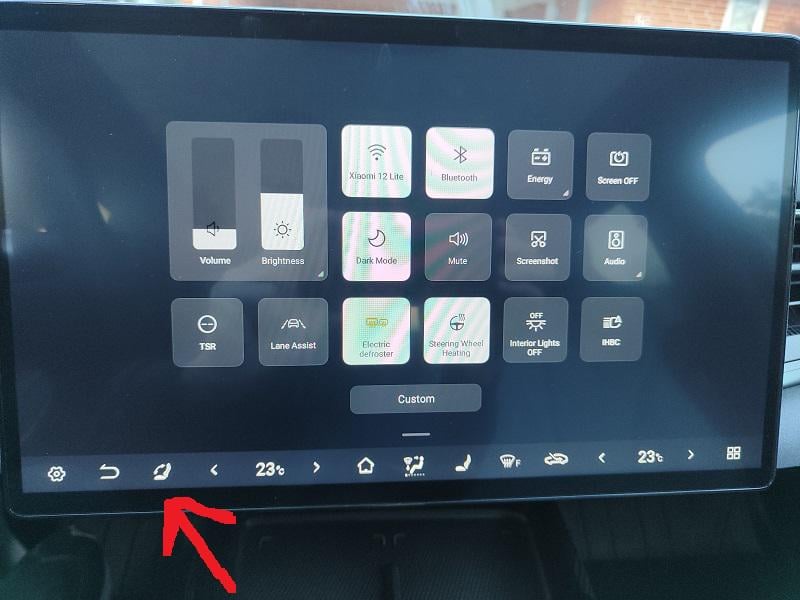
Hi, there's option power on - power off, so unlocking the car starts it: [https://www.youtube.com/watch?v=8xoTLiPDxFg](https://www.youtube.com/watch?v=8xoTLiPDxFg) Turning on seating heat / ventilation / wheel heating remotely also turns on the car, but the car is locked. We have the same situation with the seat but you can add a shortcut on the main screen, so actually when you open the car and screen is on - it's kinda easy. It's not the best solution, i've had memory buttons on my last car, also each keyfob was assigned to seat memory, but it's ... acceptable i assume, we managed to live with it: https://preview.redd.it/ukovusp6f6bg1.jpeg?width=800&format=pjpg&auto=webp&s=9066c80f25d4fb58f26f5ce4754306e6cfc21a2d My shortcuts are also tweaked to perfection due to beep-free driving, just a slide down the screen, 2 bottom shortcuts off and driving is beep-free. As you can see i also have a shortcut to turn on / off automatic high beam, that + seat memory are the biggest fails in this car, i practically don't use automatic high beam (sometimes on a highway) because it's working not ... really bad, but not the best. My previous car was much way better with it, on the other hand normal lights on the highest level give so much light that i practically don't need high beam (also on highway with 150 km/h). Other than that the car is amazing.

devops9001 2026-01-03 18:54

You just need to change wives and that's it... sorry, I'm kidding.

TitanHQ-CEO 2026-01-03 19:38

Was waiting for that:)

Grimy81 2026-01-03 21:42

We’ve got a M3 and Seal at home and everything you highlight is effectively the differences in the tech I’m afraid. Short of the suggestions above, that’s all you can do. Pros and cons for each car

Psychlonuclear 2026-01-03 21:58

Turn off auto high beam, it's shit for everyone else on the road. This is not BYD specific.

jeffreykuma 2026-01-03 22:43

It works reliably for me. The only issue I recognize is, when the car in front has weak backlights, then it switches on and off all the time.

TitanHQ-CEO 2026-01-08 19:23

Thanks all...implemented suggestions and they have helped

Add comment

Login is required to comment.

Login with Google