← Back to topic list

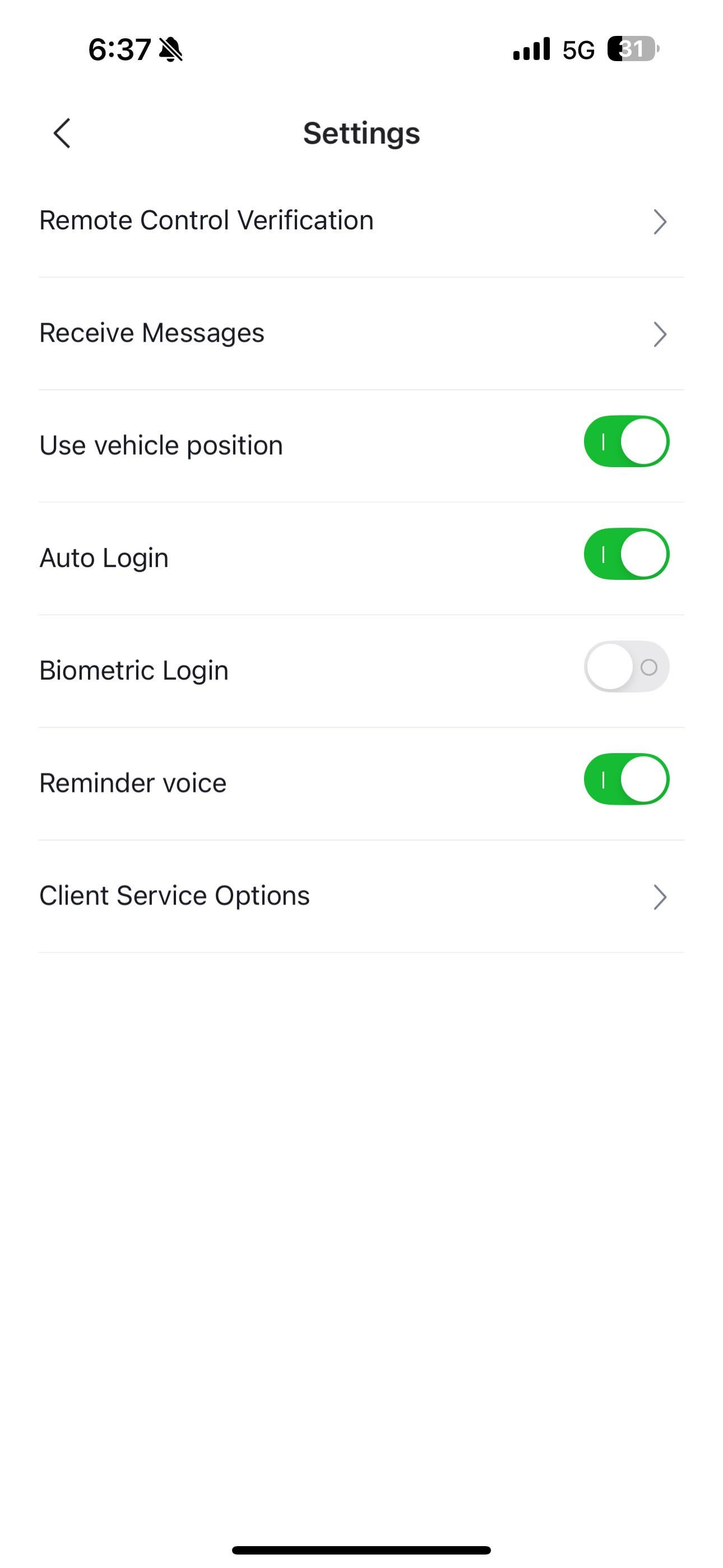
Is there a way to use faceID in the seal app for remote services? Ive toggled every option there is but it will always ask for a 6 digit pin to access remote features

crispy_gooner | 2025-09-11 03:19 | 3 views

As title says, this 6 digit pin thing is cumbersome
Comments (5)
Fit_Patient6127 2025-09-11 10:38

Yes. Here’s my settings For iOS. https://preview.redd.it/5djk51xqkiof1.jpeg?width=1290&format=pjpg&auto=webp&s=c514bfa519ea9bd2262a7ed0d7d6f4fbbac13f72

crispy_gooner 2025-09-11 11:04

I have set mine to this but as soon as I try turning on heated seats for example it'll prompt for a 6 digit pw, does yours?

Fit_Patient6127 2025-09-11 11:29

Yeah look ngl, their programming isn’t the best. There was a time where the exact same thing happened to me, or it would work for a while, and then start asking for the code… Hopefully if you just keep setting - close the app - then go in again - it will eventually stick. Did the trick for me, and I’ve been good for months TOUCH WOOD!!!

crispy_gooner 2025-09-11 11:33

Figured it out, its the “remote control verification “ where you set it

Lumenatti99 2025-09-15 17:05

No way around it. Unfortunately even if you choose biometric login it’s just for the main app. It’ll ask you to enter the stupid six digit pin to turn on the AC or heated seats remotely. Poor design, needs a software overhaul badly.

Add comment

Login is required to comment.

Login with Google