Why is my nav range so wildly different?
Roxxersboxxerz
|
2026-03-15 16:33
|
27 views
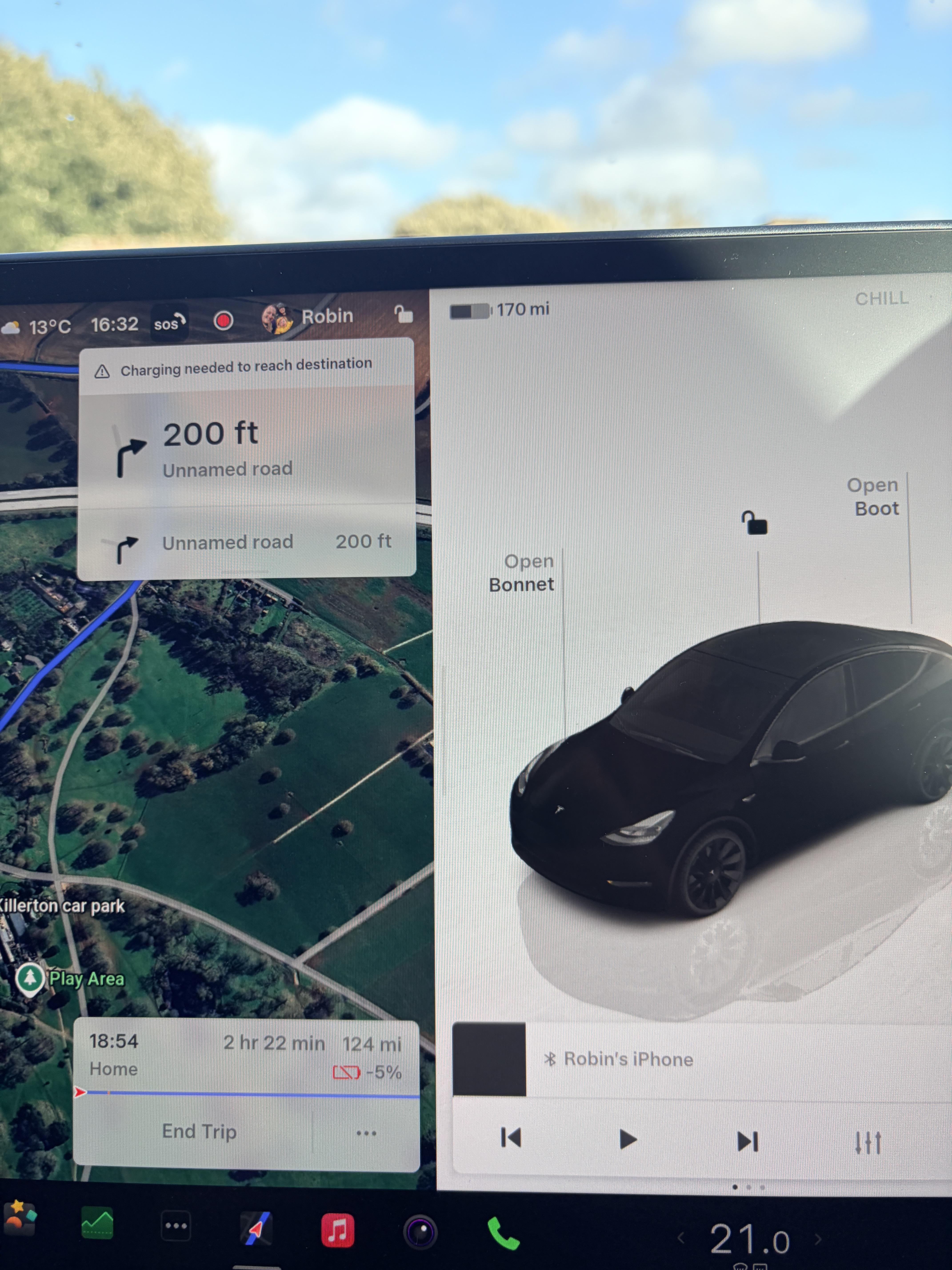
It changes based on the elevation and how fast you’re driving to get there.
That "170" number is not a real range number, it is a simple calculation of battery state of charge percentage times a flat default mile/watthour number. You should tap that number, change it to display battery percent, and leave it that way forever. When you navigate, the number displayed in your routing is an actual good estimation of your range, time, and ending state of charge. It takes into account the speed of the roads on the route, elevation changes, current temperature, etc.
Because one is based on fixed epa calculation and the other is your actual driving and what route you’re going on
You are driving 2 hours and 22 minutes, will need charging, etc... I don't understand; why wouldn't it be different?
I knew you were UK from the UI setup. But the mix of C for temperature and miles for distance is throwing me off.
Ever heard of hills?
Do yourself a favor and turn it from miles to %
They're pointing out that the car is claiming to have 170 miles of range left, yet at the same time showing that it can't drive to a destination 124 miles away without stopping to charge.
Tesla ought to update the displayed range to reflect what should be expected (or at least make it an option). Yes, I know you can find it in the energy app but, it’d be nice to see here there at a glance
But again, there are tons of variables here. Are they driving through mountainous terrain? Mostly highway? With AC blasting? At what speed? All of those factors will affect the mileage.
This!
Turns out it was pretty accurate, got home with 0% :)
Most likely ending at a decently higher elevation than you started. Since it looks like you have premium connectivity I think it also accounts for wind forecast, so if you were spending all or most of that also going into a stiff headwind that'll reduce your defacto range
Top number is a fixed EPA rated range. Navigation estimate takes in to account elevation, weather, traffic, speed limits, etc. The EPA rates range is never guaranteed due to so long real world factors.
That is why I’m on gas cars !!
The problem is that number is supposed to reflect state of charge, which does not vary based on where you’re going. It’s not really supposed to tell you a distance you can go, because that depends on where you’re going. It’s more of a measurement of energy available, so it needs to be a standard unit of measurement. The navigation tells you how far you can go and that’s what it’s for.
While you're driving you can even see a detailed breakdown of how well you're doing against the estimation. And particularly what is causing the difference, ie. Driving too fast or actual road conditions temp,wind etc being better or worse than expected.
Switch to % and forget the miles. It’s useless. That indicator tells you how much energy is in your battery. When you switch to fake miles, it takes the total available power and divides it by the EPA’s average efficiency number. On a GOOD day, no one gets near that number. So off the bat, you’re not going to have that total range. Other things it doesn’t account for is average speed, elevation, weather, and projected regen. Unlike that fake number, the nav takes ALL of these factors into account. That’s why its predictions are much more accurate, albeit less than what the fake miles shows. IN ADDITION to all that, you’ve got to understand that everything that uses power will take it from that battery, IE: It will take those fake miles to run. The HVAC, the computers, the lights, charging your phone, the radio… all of that takes power so all of that will use up those miles too. The only way to get anywhere near the total range showing is to drive 40 MPH, with no elevation changes, no headwinds, and with your HVAC off. If you’re not willing to drive like that, % is the way to go and when you’re questioning your range, use the nav. It won’t lead you wrong.
range at the top isn't factoring in things like speed, wind, hills on your route, traffic, AC/Heat usage etc - and the nav range is factoring in (i think) all of those things. that's why.
Amazing that actual driving is literally always 25% lower. Almost like Tesla lied to all of us on what these cars are capable of.
I have better efficiency that what Tesla says.
Yep. 25-40% depending on weather and if it’s local or road trip highway distances
You’re a rare case
What a gamble lol. Nerves must have been shot.
Login is required to comment.
Login with Google