ReaditorRedditor
2026-02-20 01:26
Dumb question but how do you know its the wifi draining it?
Tree_Puff
2026-02-20 01:26
If WiFi is draining 4 percent of your battery overnight, WiFi ain’t your problem
[deleted]
2026-02-20 01:27
Have it forget your WiFi.
iDragonk
2026-02-20 01:28
I have left the WiFi on and off alternatively did a few days. And everytime it was on the battery drain was atleast 2%. Usually see it under stand by
unamatadora
2026-02-20 01:28
It’s not the WiFi.
iDragonk
2026-02-20 01:29
When I turn WiFi off it drops to under 0.3% consistently
iDragonk
2026-02-20 01:31
I am about to try that next
soscribbly
2026-02-20 01:31
My model x does the same thing. Wish I could turn it permanently off until I need it.
Battery is fine when parked and wifi is off
argentina4eva
2026-02-20 01:35
Yes this is the only thing which will work.
windraver
2026-02-20 01:43
A few things to consider.
1. Is sentry mode enabled? Sentry mode eats battery like crazy
2. Are you checking your battery charge frequently through the night?
Making the assumption you have a MYLR with 75Kwh battery...
2% is 1.5kwh
A quick lookup says that Tesla wifi should only consume .25 kwh per day. So something is definitely draining. Your battery at 1.25kwh during the duration overnight and that isn't wifi.
iDragonk
2026-02-20 01:46
Sentry off at home. Low power mode is on. No I don’t check the app. Background refresh is turned off for the app. Also if it’s the mobile app the usage shows up under mobile app. This drain I am referring to shows up under vehicle standby
Freewheeler631
2026-02-20 01:49
Your phone key might be in range of the car. Is it falling asleep?
iDragonk
2026-02-20 01:53
It does fall asleep. And car key is not in range. A couple times I have left phone at home and car wouldn’t unlock.
Also most time even with the phone in my pocket the car won’t unlock. I open the app on the phone. I know this is because the background app refresh for the Tesla app is turned off on my phone
If it was the phone the battery drain would have been same when WiFi was on or off
TheCenterForAnts
2026-02-20 02:02
It's probably downloading/uploading. It moves gigabytes at times, so if it's a weak signal and connecting/disconnecting to do that that may be the issue.
iDragonk
2026-02-20 02:06
That was my guess too. After seeing posts here that shows gigabytes of data being uploaded. Anyway I am more interested in know if there is way to permanently turn off the WiFi? I can turn it on when I need it
jrender5
2026-02-20 02:07
It could definitely be the wifi for somebody who is suspicious of the reasoning. Try flying and not having your phone in airplane mode. The constant search for a signal can drain your battery very quickly
Jedi_Gill
2026-02-20 02:12
I honestly turn off the Wi-Fi but I do pay for the $10 online service. My main reason was that the internet connection would always cut out when I got home and also left making navigation, music, and Grok conversations take longer than they should to just drive off and go.
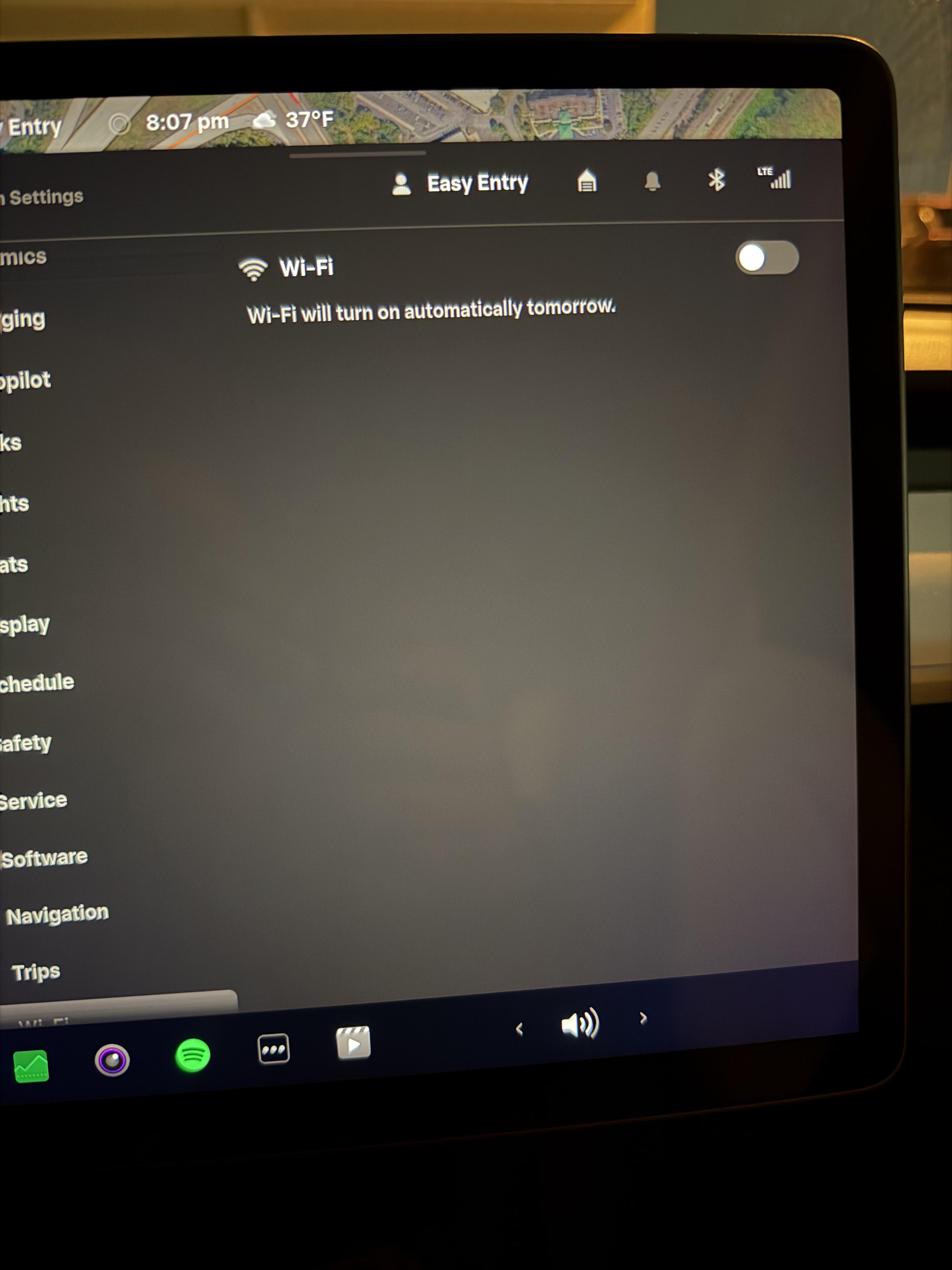
I only connect once there is an update and the Wi-Fi is permanently off. I did get a message that said that even if you turn off the Wi-Fi, it will automatically turn back on the next day. I think that's bullshit and screams them hijacking your Wi-Fi for their own interests instead of yours.
I wouldn't be surprised if the car cpu power and Wi-Fi is being to power an Ai system or other mesh like processing systems.
Moose-Turd
2026-02-20 02:21
Battery percent is calculated by the BMS which uses battery temperature in its calculation. When you park overnight more than likely your battery is cooler when you first parked it. So there may not be true "loss" versus BMS calculating a lower % due to a difference in temperature.
So instead of looking at the cars "losses" after the first 24 hours, look at the car at 48 hours parked and compare it to the 24 hour mark assuming the temperature change over the two days are about the same.
Only data I can offer: Parked MYLR at airport around 4:30 AM for a 3 day trip. It was approximately 45 F when we left. Returned to the car at 5:30 pm 3 days later to warmer weather at 85 F had 1% more displayed for the battery.
The car did not gain any more energy while parked but the BMS calculated more availability due to warmer pack.
TheCenterForAnts
2026-02-20 02:25
it remembers my wifi preference for each profile, but that may just be in drive... i doubt there's a way to turn off as it needs to do OTA as a safety measure....
is a wifi extender an option for you?
rExplrer
2026-02-20 03:09
Do you have FSD? If yes, did you disable the standby for summon?
iDragonk
2026-02-20 03:11
Yes. But I don’t even want to connect to WiFi. The car just turns it on by itself
[deleted]
2026-02-20 03:20
You have third party apps? They're probably keeping your car awake
iDragonk
2026-02-20 03:22
Nope. No third party apps
MojoMercury
2026-02-20 03:23
Do you have good WiFi at your vehicle location? If the client device has a poor connection it will require more power to send/receive data.
iDragonk
2026-02-20 03:28
Nope. Weak signal. I can’t turn the car WiFi on permanently. Wondering if there is an option for it
Freewheeler631
2026-02-20 04:19
Check the energy section in the car. It will tell you what is using energy by percentage. It’s not your WiFi, and I’m not sure how you came to that conclusion, but the energy section will tell you what is draining the battery.
TheCenterForAnts
2026-02-20 05:57
You have to. Needs it for updates and such. Like your windows pc…. Luckily it doesn’t do it and force restart while you’re using it
Regardless, set up that extender and confirm WiFi doesn’t still drain battery, because if it still does, you may need a service visit
drivingaddictionchan
2026-02-20 06:02
same issue as you. I Don't think my wifi has turned back on after i turned it off...not sure though.
drivingaddictionchan
2026-02-20 06:02
its the wifi, i had the same issue.
Ch33s3m4st3r
2026-02-20 07:41
I disconnected my home wifi from my car completely with a "Forget network" setting. Now if I need to update my car I use my phone's hotspot and my car connects to that wifi.
Where I live everyone has almost free unlimited 4G-5G connection so it doesn't take much time to just leave the hotspot on to download an update when driving. Alternatively you can just use your home wifi through your phone and wait for the update to finish downloading and then turn off the hotspot.
dragonovus
2026-02-20 08:50
Yes indeed the. It wouldn’t be able to upload GBs of data
iDragonk
2026-02-20 10:53
This battery drain shows under the stand by section of the app
iDragonk
2026-02-20 10:55
Pretty much what I do rite now. Will have to remove home WiFi from the car tho
mazsive
2026-02-20 11:42
That doesn’t make much sense.
Freewheeler631
2026-02-20 12:40
Have you updated software recently? It’s been reported that drain can increase after a software update, but a reset of the car (both steering wheel buttons) clears it up. Good luck.
YouKidsGetOffMyYard
2026-02-20 13:44
The poor wi-fi may be keeping the car awake for some reason, Maybe it's trying to download a update or upload Videos the entire time and just keeps trying. Normally it goes to sleep once it has finished doing that stuff.
Try turning off your data sharing to have it stop uploading GB of videos and driving stats each night. Or just forget that wi-fi network.
mifesto1
2026-02-20 14:19
yeah this doesnt make ANY logical sense. its like ICE owner blaming their car for using gas, no its not. YOU are using gas to drive LOL. wifi is just connection method, its whats using the wifi is the source of your phantom drain issue. as others said maybe your wifi is so weak the car is forced to stay awake for extended periods struggling to download updates. so upgrade your wifi, move wifi router closer to car, or get wifi extender so it can reach the car properly.
iDragonk
2026-02-20 14:31
Jeez didn’t know I had to spell it out for you every single thing.
Most folks here got my point. When I say WiFi it’s the WiFi connection draining the battery when WiFi signal is weak. Also when I turn off the WiFi on the car it randomly turns on (next day or 2-3 days later)
iDragonk
2026-02-20 14:33
Yup poor WiFi signal for sure. But I can’t turn on WiFi off completely. It’s turns on in a day or 2-3 days later. Only option is to forget all the WiFi networks
mifesto1
2026-02-20 14:33
we're giving you workaround. car needs the wifi, its probably why computer is turning it back on. we're giving you suggestion to your prob weak wifi signal. turning wifi off is just avoiding your REAL issue.
endfossilfuel
2026-02-20 15:06
Not sure why this is getting downvoted. For some reason, wi-fi is keeping your car awake and draining the battery. Probably uploading data, as others suggested. Totally plausible amount of use for just running the computer, similar consumption to leaving sentry mode on.
iDragonk
2026-02-20 17:59
Done that. Everytime I would see the usage under standby was over 2 % I would reset the car. It used to work before but not any more
lmamakos
2026-02-20 20:29
You could always just change the WiFi credentials so they don't work. Modify the SSID it looks for to ensure it doesn't find something to try to connect to.
Common_Persimmon_100
2026-02-20 23:12
Maybe you have sensory mode on. That's the biggest drainer.
iDragonk
2026-02-21 00:38
Sentry is off. Low power mode is turned on
aliens_300c
2026-02-21 01:15
When I first bought my car I had some rural internet with only a 5mbit upload speed and was astonished to find that my car had sent like 19gb of information in just a few days. Had to turn off a lot of the ‘share this information with Tesla to make driving experiences better’ stuff. Have better internet now but I’ve kept all the settings the same. Not trying to give tessler any more information than they already have.
NoFaithlessness9789
2026-02-21 03:57
Just buy a WiFi repeater/extender. You don’t even need a great one. A cheap one that just supports WiFi 5 or WiFi 6 is more than good enough. I think the one I used to use before I went to a mesh system in my new house I see on sale for less than $15 on Amazon (TP Link RE220). Back when I was in a condo I hooked it up to an extension cord on the balcony and stuck it in a plastic waterproof electrical box (also $15) and it worked great.
No_Skill_6469
2026-02-21 04:24
Yeah if your signal is weak it can cause phantom draining. What I do is I forget the network and when I get a notification for an update I readd the network, download and install update and then forget the network again.
[deleted]
2026-02-21 05:10
*This post was mass deleted and anonymized with [Redact](https://redact.dev/home)*
apparatus ring doll abundant continue direction scale cake books stupendous
Congenial-Curmudgeon
2026-02-21 09:56
If you can add an AP or open mesh to strengthen the WiFi signal your car’s energy consumption should go down.
I added an AP next to the garage and it helped a lot.