OmagaIII
2024-09-12 03:35
I use Uber daily, and I have been wondering why this isn't a thing. Most cars now have some kind of display and Android/Java/Apple software.
Just having the option to add the Uber app would be a step in the right direction, cause some drivers give me anxiety when they look down at their phone on their lap while on a highway or coming up to busy intersections etc.
Car phone holders are rubbish at the best of times. Feels like this should be a thing more often than not. Either that, or allow a mobile to cast to the car display if apps cannot or should not be loaded. (Cause people do dumb sh!t, and I can see some clown loading an OF app or some other braindead idea)
Looking forward to seeing this within cars and trips.
TheRealOtakuTaco
2024-09-12 03:42
Seems I can’t access it yet?
Cg006
2024-09-12 03:47
I dont drive for Uber.. but this is an awesome addition.
SpicyWongTong
2024-09-12 04:00
Probably need to wait for the update to push to your car
This_Freggin_Guy
2024-09-12 04:01
one step closer to robotaxi. good way to beta test some more software features.
TheBigAndy
2024-09-12 04:09
My Uber app doesn't have this option (android, upp to date app). I'll try it out when I can but I actually like using my phones navigation because even the lowest volume level on the Tesla Nav is too loud vs Music.
Edit - I also Don't have the option for the battery-aware matching either.
ken830
2024-09-12 04:16
In a sense, this is awesome, but also, about time.
UnluckyPenguin
2024-09-12 04:20
You can disable voice navigation. Keep listening to music without interruptions from nav. Unless you like voice navigation... but on a really low volume, then use your phone I guess.
cbtboss
2024-09-12 04:26
Hope Lyft can add it as well.
[deleted]
2024-09-12 04:27
There should be more third party apps in Tesla.
SirConfused1289
2024-09-12 04:29
It’s not a car update.
Uber is just using the Tesla API’s to send routes to the car and read battery information. It’s actually a fairly simple integration, which is neat
SpicyWongTong
2024-09-12 04:31
O that’s cool, I was imagining an Uber App on the car like Netflix, etc… this sounds way better
at_one
2024-09-12 04:36
So maybe update the Uber App on the smartphone?
[deleted]
2024-09-12 04:42
Can it not be done in the browser? We can use gmaps navigation in the browser, why not uber? This way it will not need an explicit support from tesla/rivian/lucid or whatever...
Jon0911
2024-09-12 05:01
As a full-time driver, I won't be using the future feature of logging into my account. I have a new Android phone, so I can use the circle search to quickly send addresses to my Tesla. I don't want to be limited on the types of rides I can take based on my battery percentage. If it's a long ride, I'll charge the car with the customer in it. I prefer to do this because I get paid per minute and per mile, so I get paid to charge the car with the customer. Even if I wasn't in that market, I think you'd still be excluded from very long trips because you wouldn't have enough battery to make it all the way. I'm glad Android introduced circle to search. I circled the address, highlighted it again on the map, and then it sent it right to the Tesla. Uber doesn't need any information about my vehicle's live status. They already use so many different factors to discriminate against drivers, they don't need more.
IPThereforeIAm
2024-09-12 05:13
I would not be happy to sit in the car and wait for you to charge
Jon0911
2024-09-12 05:15
If you ordered a ride for over 100 miles, I would hope that you would be comfortable with a 5-10 minute charge. Or 3 minutes for your Uber driver to fill up with gas. We're not always expected to have a full tank/battery. I was specifically referring to much longer trips.
Delladv
2024-09-12 05:21
This is a great addition and makes a lot of sense, has any other ev maker already implemented something similar?
This makes a model 3 or Y more interesting to the Uber drivers "world"!
Acrobatic-Savings-40
2024-09-12 05:22
It’s not working what’s going on? I don’t see anywhere it says to connect
tbenz9
2024-09-12 05:52
I agree with you. But this is not a 3rd party app in Tesla. The Uber app on your phone is integrating with the Tesla API for route and battery info. It might sound similar but in practice it's quite different.
No_Touch2473
2024-09-12 06:35
Hi.sayan 
Kuriente
2024-09-12 06:52
This should help with cold weather charging issues.
Remember all the news about Chicago superchargers not working in a winter storm a year or two ago? That was almost entirely due to rideshare drivers using their phones to navigate instead of Tesla's navigation, which resulted in their vehicles not preconditioning for charge.
Wugz
2024-09-12 07:04
Not unless people are requesting Ubers to specifically take them to a Supercharger. Navigating to regular destinations does not trigger On-Route Battery Warmup.
Kuriente
2024-09-12 07:11
Right, but out of habit, rideshare operators often routinely use their phone for nav outside of rideshare, especially when they don't own the vehicle they're operating. This update should help change that use pattern.
iqisoverrated
2024-09-12 08:16
It's not that simple. Security is a big concern when getting third party apps on your car. If a bad app compromises/bricks your phone that sucks but it isn't the end of the world for you. If it compromises your car it very well may be.
s7orm
2024-09-12 08:18
As someone who uses the Tesla Fleet API extensively, this seems like a pretty basic integration that Uber could have built back in January 2024 without any partnership with Tesla.
Jimgersnap
2024-09-12 08:28
Seems fitting since I see so many Model 3s and Ys being used or rented by Uber drivers. It would also be cool if the small screen in the back in the refreshed 3s showed Uber trip status for riders.
webtechmonkey
2024-09-12 08:40
This is pretty cool. I don’t drive Uber much anymore, but may have to go online this weekend to try it out.
It’s worth noting drivers have been able to link their Uber and Tesla accounts for some time now for the sake of syncing available range and ignoring trip requests that exceed it.
This seems fairly incremental in the sense that now they are just adding the option to use the screen for navigation.
I’m curious to see if the Tesla nav will show the same route the Uber app does. Currently, I sometimes manually type in the passenger’s destination into Tesla nav (particularly for longer trips) and often notice drastic route differences between the Uber Driver app and Tesla.
Every_Tap8117
2024-09-12 09:19
I can finally drive for uber to make ends meet because my corporate job doesn't
[deleted]
2024-09-12 10:17
Did everything it says but it didn’t work I don’t think it’s available yet it’s just being announced to become a feature soon
[deleted]
2024-09-12 10:57
In the refreshed M3 the rear screen shows traffic info and destination ETA.
matthewmspace
2024-09-12 11:01
Looking at the page, yep.
[deleted]
2024-09-12 11:09
[removed]
Drahthunter309
2024-09-12 12:24
Wonder if this could mean a partnership with the robotaxi??
TheRealOtakuTaco
2024-09-12 13:02
Yes, updating the Uber Driver App right now
TheRealOtakuTaco
2024-09-12 13:02
The Uber App might need an update, as I’m updating mines right now
TheRealOtakuTaco
2024-09-12 13:04
Nevermind, still can’t do it even after the update
Stanman77
2024-09-12 13:05
I drive ubereats once in a while, I used to just glance at the address on the screen and use voice nav to "Navigate to 123 washington street", it worked fine most of the time. But a button with API to share is a welcome option. My method would be really awkward with passengers.
I just went into the Uber driver app, it doesn't seem like this feature is live yet. At least not on the latest version of Uber Driver on my phone
Snoo93079
2024-09-12 13:17
There could be an app store for Tesla that has to go a thorough security review process. I don't think anybody wants a free-for-all.
colinstalter
2024-09-12 13:55
This is just a slightly custom version of the already present share feature. For example I can share a route from my phone’s Apple / google maps to the car via the share sheet and it instantly starts navigation.
OkAmbassador8161
2024-09-12 14:11
Agreed, though netflix and Disney are almost unwatchable as the volume lows can hardly be heard and the highs shake the whole car. When my kids watch anything in the backseat, I'm CONSTANTLY changing the volume.
ChunkyThePotato
2024-09-12 14:15
The entire OS of the screen can completely crash and the car will still drive. It's an isolated system. You can literally reboot it while driving.
Also, apps can be sandboxed in the same way, so even if it wasn't isolated, there are ways to ensure safety. Keep in mind you already have access to web apps on your car, and that's a completely unvetted distribution method.
74orangebeetle
2024-09-12 14:15
I've only done a tiny bit of uber in my Tesla (have an old account that's still active) but this was one of the two frustrations....to navigate to the Teslas screen I'd have to either share from google maps on the phone or voice control/type it into the car. This would be great.
The only other downside was that my model 3's dior handles confuse half the people.
Spider_pig448
2024-09-12 14:36
Yeah I suspect this is an indication that Uber will be providing the software for the robotaxis.
junktrunk909
2024-09-12 14:46
That would be a shitty design by Tesla if they can't run apps in isolation. No app should be able to that the entire console down. That's just basic design that we've been doing for decades in PCs etc.
iqisoverrated
2024-09-12 14:51
Pretty much every sandbox software of the past 25 years has been broken at some point. Assuming that the current crop of such software is 'indefinitely bulletproof' is not merited. They should be careful who makes apps that run on their hardware. Even without breaking isolation you can screw up the UI - simply by creating unecessary heavy load.
Tesla should take their time making sure that what people want to deploy doesn't have unwanted side effects.
The_Great_Squijibo
2024-09-12 14:54
I noticed the instructions from the uber website were incorrect. They say go into Account > Navigation > Tesla navigation, but it should be (on android) Account > App Settings > Navigation > Tesla Navigation.
junktrunk909
2024-09-12 14:59
Well obviously they need to verify any app version that gets included. But to say that it's somehow risky to include 3rd party apps because of concerns the console will crash is absurd.
[deleted]
2024-09-12 15:17
[removed]
sinkiez
2024-09-12 15:38
I'm not seeing the option to select Tesla navigation
mgithens1
2024-09-12 16:29
Same… Android user, no option for navigate on car.
[deleted]
2024-09-12 16:51
I just want to be able to play local videos without rigging up an RPI that has a PLEX server and enough network workarounds to make Comcast look competent. Which still doesn't work half the time.
samcrut
2024-09-12 17:04
Tesla wants to collect Uber data to learn how to make a ride hailing service work.
LiquidSean
2024-09-12 17:15
Wow that’s awesome!
mgithens1
2024-09-12 17:17
Android shows the last Driver app update was 5 days ago…. Still no luck here.
I checked my iPad app and it doesn’t have the feature either.
maclua
2024-09-12 17:23
I just want a Pocketcast app and I’ll be set 🙏
Astigpgriff
2024-09-12 17:29
Looks like this isn’t live yet. They either pulled it back or delayed the release. Everything is updated on my phone and still don’t have the “connect” option.
NX01
2024-09-12 17:31
Same, I tried hitting up support about it and they were... unhelpful.
JS1VT51A5V2103342
2024-09-12 18:03
Rumors of a Tesla app store need to come back.
AttackingHobo
2024-09-12 18:16
The entertainment computer is disconnected from the driving systems. It can fully restart while FSD is driving the car.
north7
2024-09-12 18:17
This sounds great (I drove uber in my Model Y when I was between jobs).
My old workflow was I would accept the ride and then manually enter the destination into the Tesla nav. It got awkward at times when the nav couldn't find the address/destination and we'd be sitting there not moving while I was tapping away at the screen.
Accomplished_Sky_899
2024-09-12 18:54
The lack there of is why the Tesla UI moves so fluidly for many years without *needing* to upgrade. Be careful what you wish for.
RecardoF_954
2024-09-12 19:47
Need a tutorial on how to do this.
dzh
2024-09-12 20:25
Getting ready for supervised robotaxi 100%
Imagine elon thinking people want to be uber drivers in their premium cars 🤣
adambadam
2024-09-12 20:40
This sounds more just like the send to Tesla button already available in Maps/Google Maps. Wonder how many people don't realize that exists in the share sheet as it is sort of hidden.
[deleted]
2024-09-12 21:57
So this is the robotaxi that everyone is talking about!
xBlackfin
2024-09-12 22:18
Does this work for UberEats drivers also? I’ve got latest Uber Driver app but I can’t find the option to enable this.
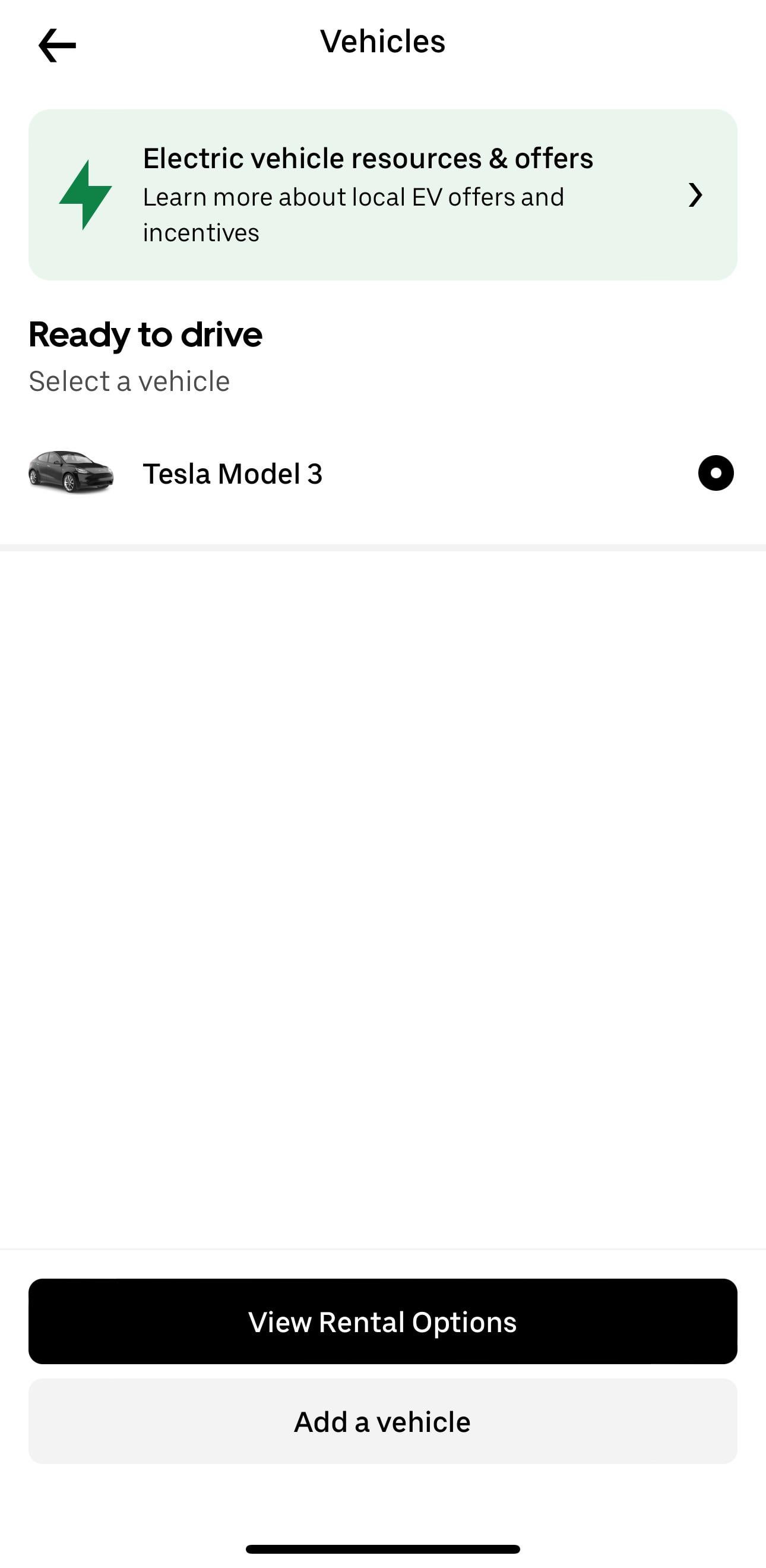
https://preview.redd.it/csm0uda8fgod1.jpeg?width=1290&format=pjpg&auto=webp&s=e1859899dc816abede358e98e02f34eb17a64a28
[deleted]
2024-09-13 03:21
This feels so obvious. Is Uber just hoping Tesla will buy them out when robotaxi finally rolls out?
burberryalgae
2024-09-13 06:12
Did you get the option yet? I don’t have it yet
King_Prone
2024-09-13 11:51
can we have waze then pls
samcrut
2024-09-13 12:36
Wouldn't surprise me too much. Elon buying out another dying company with horrible PR feels like his M.O. these days. He wants the brand recognition without the bagage, but that's not how it works.
J_Willy02
2024-09-13 13:07
I just learned this the other day, works good
Past_Challenge6886
2024-09-13 15:16
It doesn't work whatsoever. No additional configuration options within the settings app. Uber. Customer service is disgustingly stupid. I doubt Uber rolled this out. Idiots. Everything is up-to-date, software wise. I love being reminded how shitty their customer service is. That's why I cherry pic rides and care less about Uber and conveying good workmanship. Uber pay is god-awful.
Past_Challenge6886
2024-09-13 15:32
lol same
TheBigAndy
2024-09-13 16:51
Still nothing
mgithens1
2024-09-13 18:37
New update today for Uber Driver app on Android… still no Tesla option.
The Uber app is such garbage.
Dependent_Virus2556
2024-09-13 18:44
It’s coming soon ! Not available yet
kipphoward
2024-09-14 15:24
My wife and I drive for Uber at times. The Tesla integration is working on my phone and I used it this morning for the first time (worked great). My wife's phone does not offer the option. A while back I shared my battery info with Uber app so maybe that gave me the option.
I did have to unconnect/reconnect my Tesla account and add navigation to the permissions while connecting Uber to my Tesla account. But that assumes you even see the "connect" button in the Uber app which I don't on my wife's phone.
My wife's Uber driver app has always been a little different than mine. Mine used to show the ☕ button for going offline temporarily. Hers never show this. Something seems different between our Uber accounts.
Dstrongest
2024-09-14 16:46
They need connect Waze yo Tesla navigation . I was not real impressed with their driving navigation directions . But it’s hard to get a real feel on a 25 min test drive .
OptimumTaurus
2024-09-14 21:05
Same here, no connect option after updating app
reasonable_wolf
2024-09-14 22:25
Where is this button?
keiye
2024-09-14 23:31
I take a lot of Ubers and haven’t even had a driver stop to fill up. That’s more reasonable if we’re taking a 300+ mile trip.
TraditionUsed5033
2024-09-15 13:54
What model phone is it working on and not working on. I have a Samsung, and I do not have the option.
kipphoward
2024-09-15 14:03
It works on Pixel 7 and not on Pixel 8 (phone was just setup for my wife). Her previous phone as of 9/4 was a Pixel 4a-5g and I don't believe the battery linkage was working there either.
TraditionUsed5033
2024-09-15 14:19
Thanks for the info. Hopefully, Uber is working on this..
adambadam
2024-09-15 17:06
In the built-in iOS share sheet (same place if you were to try to text a location to a friend from Maps). There should be a Tesla logo and it will send the pin to the current car you have open in the Tesla app.
Here's a video I just found if that doesn't make sense: https://www.youtube.com/watch?v=0K7EN538PZs
Medium_Cockroach_425
2024-09-15 17:39
I think you have to wait for it to get your app updated as the integration is set on the app. I'm waiting on it as well
Teslaaforever
2024-09-15 21:27
Because they thought they can release their app to use for robotaxi, but after this move I guess they are losing faith
toddbrosen
2024-09-16 01:29
Works for me on a pixel. It's under account and data sharing.
SpikedBladeRunner
2024-09-16 13:37
This isn't an app. It simply sends the location to the car and the car calculates a route. This just saves you a few clicks on the app. Waze integration in this manner would be completely useless.
mw1029
2024-09-16 17:57
Hmm I don't even have that option in the account menu. Might be location specific?
Majestic_Progress_53
2024-09-17 22:27
Go to account, pick your Tesla and the option will be there
[deleted]
2024-09-17 22:37
[removed]
Tessietesla
2024-09-18 00:19
On iPhone> uber account>vehicles>share vehicle data
Far_Recipe_6262
2024-09-18 00:32
Same i thought i was doing something wrong
Alert_Violinist_4076
2024-09-18 05:15
Not working here, both app and car up to date, ios 18, uber support team is …
TeslaFRA
2024-09-18 06:58
There should be an app like ntegration for police vehicles available. Awful when you see laptops integrated in police cars to do easy tasks. There are so many Tesla police cars available and with all the cameras an ideal vehicle for documentation of police activity.
Would love to see more Teslas as police cars and that Tesla would consider putting some effort in this direction (but not help with the radar guns, please)
weavershaven
2024-09-18 13:23
For anyone still trying to connect. Here's how it went for me.On the android>Uber app>account>click on your car picture>share data
Past_Challenge6886
2024-09-18 14:35
Same. I could care less about all the sweeping improvements Uber has made and just give drivers better pay.
TraditionUsed5033
2024-09-18 14:59
So is it working for you?
TraditionUsed5033
2024-09-18 15:06
What phone do you have? It's not an option on my Samsung fold 6 
Past_Challenge6886
2024-09-19 18:48
Second Uber driver app update since roll out. No Tesla uber navigation integration settings via IOS iPhone. What a shitty company Uber is. Everything up-to-date September 19
Ello-Asty
2024-09-20 23:30
No, Uber website is just account related, you need the app to drive
lilpoopysquirtz
2024-09-21 11:40
still not able to do this
TraditionUsed5033
2024-09-22 21:28
Same
SvnnyMoney
2024-09-23 13:07
Has anyone gotten this to work? I dont even have the option for it. Im in a 2021 model Y long range
OptimumTaurus
2024-09-24 21:22
Still nuffin'
jwegener
2024-09-26 08:20
SO awesome.
jwegener
2024-09-26 08:21
Next stop: let passengers control the hvac and music :)
TheFuzzyMachine
2024-10-01 03:40
This is an api integration that does two things:
1. Only accept trips within your range 2. Send the navigation directly to the car so you don’t need to type it in
No ui in the car
Magnus_Tesshu
2024-10-04 04:45
This just doesn't show up for me. I think the geniuses at Uber don't have all the models of teslas have this option for some reason, or it doesn't work if you're only on UberEats. Pretty sad honestly, especially after 3 weeks
[deleted]
2024-10-04 10:43
I do not see a connect button anywhere on my screen
SwaggyOnes
2024-10-06 13:00
that’s great
eddielee817
2024-10-06 21:20
Yep working in mine. From the app go to account>app settings>navigation and select the one to set the navigation app to Tesla Navigation.
The shitty thing is that I think it sends the longitude and latitude to the Tesla so the street number displaying on teh Tesla nav is incorrect 90 percent of the time (at least where I'm located in Socal)
ericgcamp
2024-10-08 02:42
Nothing. Still waiting here!
Evening_Swordfish803
2024-10-08 11:05
I'm not fond of Uber deciding which trips are within my range. On longer trips the rider usually doesn't mind if I stop for a few minutes to recharge.
Evening_Swordfish803
2024-10-08 11:07
Well, first you have to bring up the Google app and type in your destination. This kind of defeats the whole purpose of convenience.
cindririco
2024-10-08 13:03
Nope. Select Google as your main navigation app on uber. When you select navigate, it takes you to Google map and you can share to tesla from it
agonyou
2024-10-09 02:52
Anyone have this in their app yet?
willpowerltd
2024-10-09 23:37
Not yet. My third Uber support chat rep told me that it's a phased rollout, so we just need to wait. It's been a month, though. 😞
zm1868179
2024-10-11 02:31
Yeah they told me it's not available to all drivers yet. But the dumb thing is I still don't have the connect option under vehicles that let you share battery info with Uber. So if you did Uber that it would send you rides that track your battery info. That option is still not available to me and that came out months ago.
willpowerltd
2024-10-11 03:27
Same here. That connect button never showed up. '21 Model Y LR.
spindrift_20
2024-10-13 06:23
Also for warranty and charging purposes.
TraditionUsed5033
2024-10-19 13:17
This still isn't available on my app
HirsuteJim
2024-10-20 16:22
There is NO CONNECT button for me. Anyone else have this problem? Both Uber Driver app (v 4.484) and Tesla app (v4.38.0) are the latest versions that exceed the stated minimums.
Does anyone have a fix/workaround?
ApprehensiveCat7533
2024-10-26 16:08
I also connected my account when it was only for range tracking, just like you. Later, I also had to “unconnect/reconnect” my Tesla account, although I had a button that said ‘update’ to add navigation. For me, the process involved signing into my Tesla account through an in-app browser pop-up in the Uber Driver app. It informed me that I would first need to revoke Uber’s access and then add it again, this time “checking all the boxes.” I reached the point where it said “revoked” with a big green checkmark, but I could only return to the app. I wasn’t prompted to reconnect and check any boxes again. When I went back to the app, it said it couldn’t connect to my car right now, but it still showed in the settings that my Uber account was set up to connect to my car (like it was just temporarily failing to connect). I could then start the same loop over again. I’ve signed into my Tesla account in a browser, gone to the page to manage third-party connections, and I can see that its access has been revoked. I’ve tried resetting my password for both my Uber and Tesla accounts, signing out of all my Uber account sessions, deleting all Uber apps from my phone (it seemed like overkill, but that’s what Uber support suggested), and then restarting my device before downloading the driver app and signing in again. I can never get it to clear the revoked access token, even though Uber says that’s something stored on my device, not their servers. From what I understand, SmartCar is the company I actually gave the literal access to my Tesla account, and they moderate the access granted by Uber. So, I contacted them. I was eventually contacted by a SmartCar software engineer who asked me a bunch of questions, provided me with troubleshooting steps (which I tried), and then told me they’d get back to me with a solution or keep me updated. That was a month ago, but I haven’t heard back. Uber keeps closing my service tickets, leaving a message like, “This isn’t rolled out for everyone yet. If you don’t see the option to connect, you don’t have access yet.” I keep clarifying that I do have access and that range tracking worked before I tried to follow their process to update access for navigation. Now, my account thinks it’s connected to my car, even though that’s not the case, and I can’t reinitiate the process. I’ve also reached out to Tesla directly. They told me to make a service request, which I did. Then a service advisor told me that’s not something they can help me with, and gave me a phone number to call instead. I did, and the person on the phone said I needed to contact Uber to fix the issue.
kipphoward
2024-10-26 17:30
That sounds awful. So sorry you are having to go through this process. It has been a while since I got it working but I recall doing most of the things you mentioned. IIRC, I did revoke access and then reconnected and added all access and then it just worked. Sorry that that doesn't help you much.
IMO, Uber needs to stop doing this A/B testing where some of their users get some features and others don't. Maybe this is the exact reason as they don't have the process worked out fully. But in that case, they really need to engage with users like yourself to figure out the actual issue and fix it. I'd say your best bet is to follow up with the SmartCar folks.
kipphoward
2024-10-26 17:32
My wife still doesn't have the option either.
kipphoward
2024-10-26 17:40
For me, I used to send the destination with Google maps and then share that to my Tesla. I used to vocally repeat the directions with "navigate to ..." But the car misheard me a couple of times so I stopped doing that. Going through Google maps was more reliable but required about 7 screen taps with is not ideal and can be unsafe while driving.
The new integration does exactly what it should and just sends the destination to my car after that short time out. No touching anything, besides accepting a job, and the car's screen displays the directions. It is quite nice.
burberryalgae
2024-10-26 17:41
Same I still don’t
Low-Equipment-4669
2024-10-28 22:24
Which city are you in? It’s pretty obvious at this point it depends on which city you drive in
eddielee817
2024-10-28 22:27
Idk how you came to the conclusion that is it pretty obvious that it depends on the city? I drive in LA County and Orange County.
QualityMindless1474
2024-10-29 17:38
Just got the option this morning been waiting awhile as well
Financial-Sun-47
2024-11-02 01:10
I can't get Tesla navigation to become available on my Uber Driver app
Low-Equipment-4669
2024-11-03 01:49
Changed cities to Los Angeles County from Ventura county and was immediately sent an email to add Tesla Navigation to connect to Uber Driver app. Bad news is that I really don’t like it that much. It disables turn by turn navigation on the Uber Driver app, and then you manually have to hit “Navigate” button to send it to the Tesla and then again manually confirm it again on the Tesla screen. Unfortunately none of it is automated at all, ended up turning it off. I have a 2024 Dual Motor Model Y.
eddielee817
2024-11-03 02:28
I see.
It's automated if you select the option to auto send it to your Tesla. But for the most part I don't like it either. Uber navigation takes a significantly much more efficient route in comparison to the Tesla's.
FrontList
2024-11-03 19:13
Can anyone confirm this is true? I can't find a single person who has been able to make it work.
BobaFett2015
2024-11-06 18:22
This post is 55 days old and I still don’t have this feature…
TheRealOtakuTaco
2024-11-06 22:06
Same, and I received a message about it but still don’t have access to it?
Stanman77
2024-11-07 23:50
Yeah man. It's not there. One day it will be there. Uber announced the feature without having it ready. Typical
creep3rf4ce
2024-11-08 00:41
Do all models qualify I have 2021 model 3 and still no option for it
No-Rock9876
2024-11-10 15:29
I am an Uber driver and I can’t seem to get it to work anyone else has had issues?
Ill-Leopard8470
2024-11-16 10:23
Has anyone gotten this to work? I’ve updated, uninstalled, and reinstalled the app and it still isn’t available
Ill-Leopard8470
2024-11-17 09:40
How did you get it to appear?
Ill-Leopard8470
2024-11-17 09:41
Did it ever work for you?
AdditionalElk7732
2024-11-17 20:43
Just fight with them on the phone. They will say no anyway. But give them a poor feedback regarding their customer service afterwards. Then you’ll get your access like I got lol
BobaFett2015
2024-11-17 20:55
Fight with who? Uber or Tesla?
AdditionalElk7732
2024-11-17 20:57
Uber
Disastrous-Bend-2122
2024-11-22 08:25
I been trying for a week now back and forth with uber support they keep sending me step by step guide. Not sure what’s actually going on! Frustrating !
Disastrous-Bend-2122
2024-11-22 08:33
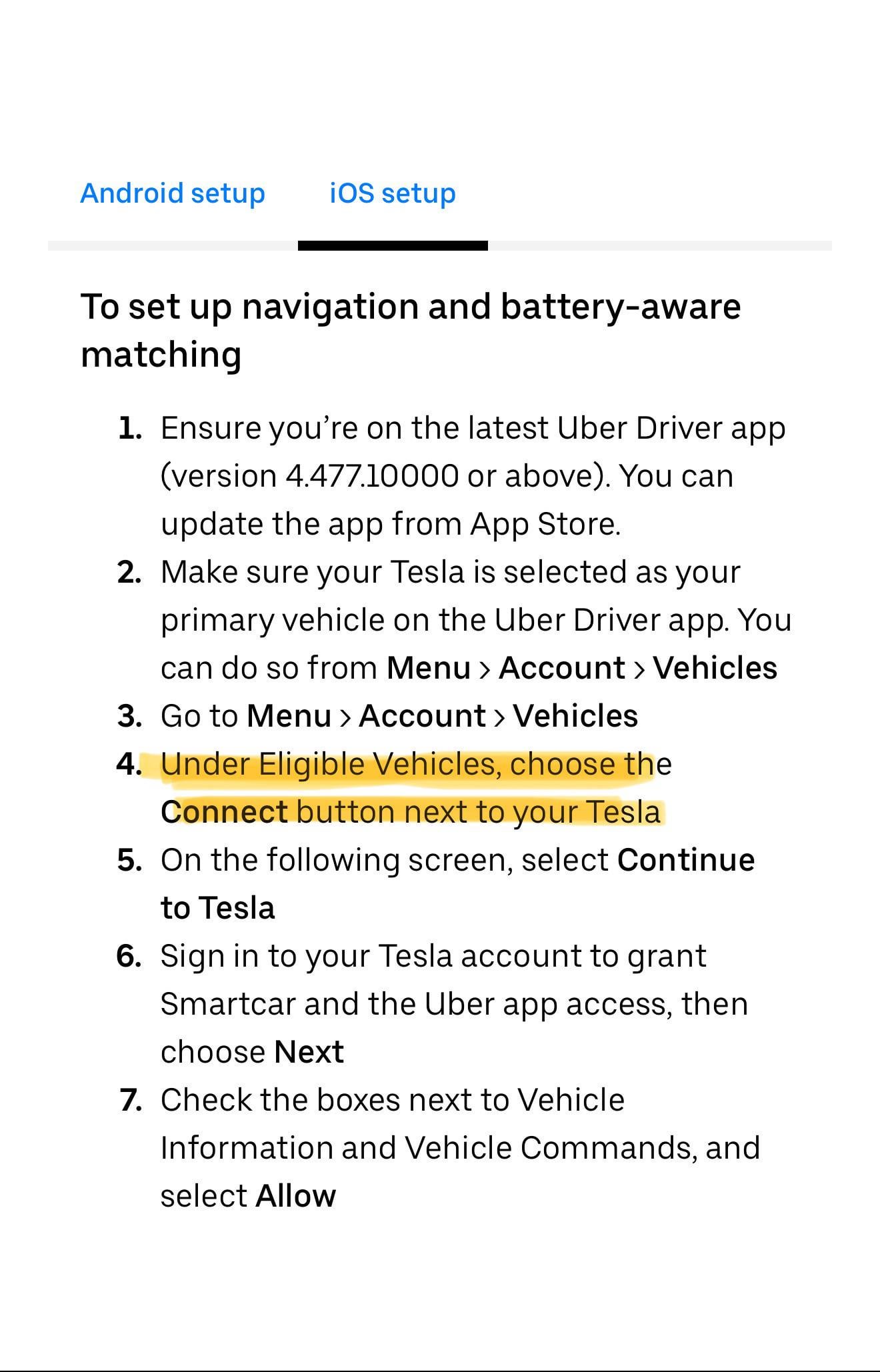
https://preview.redd.it/i89jq9rcze2e1.jpeg?width=1320&format=pjpg&auto=webp&s=438450d78014e16a2f6ea2a7fec399735d14903f
This is point I’m stuck on
FrontList
2024-11-22 16:35
So does anyone have this feature yet???
airj2544
2024-11-23 23:37
Pretty worthless. Came here for the same reason as everyone else. No access. I contacted support and they had not idea what I was talking about even though I gave them the URL to the program with the steps. Sounds like they’re still just testing which is why not many people have access yet. Not sure why they created a landing page for the program if it’s not a wide rollout. Pretty crappy execution if you ask me.
Specialist_Park8583
2024-12-06 17:15
I got it on mine, it wasn’t there before, I’m getting ready to make a post explaining how I did it.
airj2544
2024-12-06 17:20
I got mine a few days after posting this. Maybe it’s because I hadn’t use my account that I was included in the beta.
Specialist_Park8583
2024-12-06 17:36
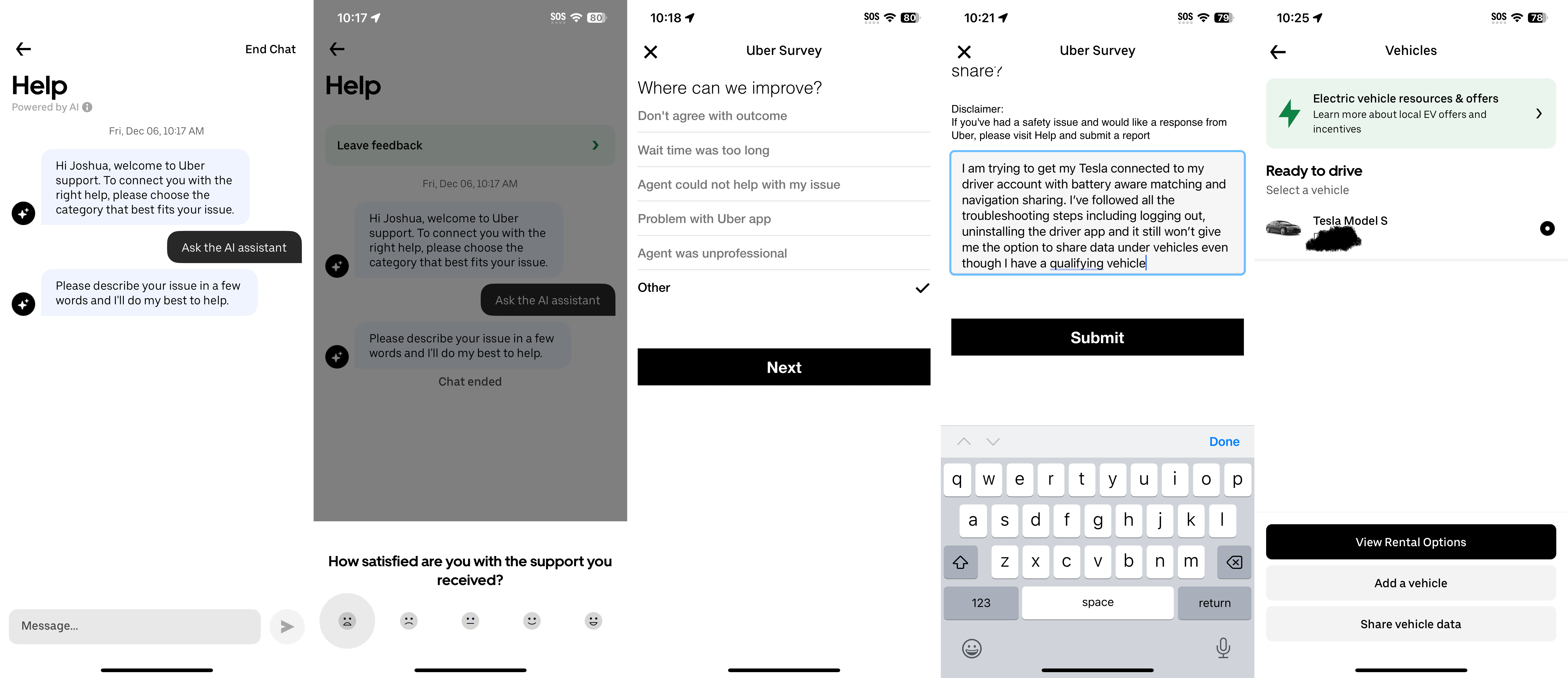
So to make this work if you don’t have the share data option under vehicles. From your driver app goto menu, help, contact support, push end chat, give it a sad face, tap other, and you can use the message in my screen shot or type your own, then push submit. I did this and it appeared 24 hours later.
https://preview.redd.it/j6qparj3l95e1.png?width=6420&format=png&auto=webp&s=fc261b4904d8b1834bb73da442de1e7bb897d92b
FrontList
2024-12-17 14:54
Most passengers would be upset if I did that.
MultiKoopa2
2024-12-29 23:59
https://www.uber.com/us/en/drive/driver-app/tesla-navigation/
This gives a server error and I can't read the page, even if I go to archive.org, somehow.
Does anybody have the instructions for this?
EDIT: Firefox was the problem, apparently. Opening in Chrome worked.
**Android setup**
**For navigation**
1. Before setting up Tesla navigation, ensure you have the Tesla app installed on your phone and that you are signed into it using your Tesla credentials.
2. Ensure you’re on the latest Uber Driver app (version 4.487.10000 or above). You can update the app from the Google PlayStore app.
3. Make sure your Tesla is selected as your primary vehicle on the Uber Driver app. You can do so from Menu > Account > Vehicles
4. Then visit Menu > Account > App Settings > Navigation in the Uber Driver app
5. Choose Tesla Navigation as your primary navigation
6. Use the app as normal
When you accept your next trip and start navigation, the destination information will be automatically shared to your Tesla display.
**For battery-aware matching**
1. Go to Menu > Account > Vehicles
2. Under Eligible Vehicles, choose the Connect button next to your Tesla
3. On the following screen, select Continue to Tesla
4. Sign in to your Tesla account to grant Smartcar and the Uber app access, then choose Next
5. Check the boxes next to Vehicle Information and Vehicle Commands, and select Allow
**iOS setup**
**To set up navigation and battery-aware matching**
1. Ensure you’re on the latest Uber Driver app (version 4.477.10000 or above). You can update the app from App Store.
2. Make sure your Tesla is selected as your primary vehicle on the Uber Driver app. You can do so from Menu > Account > Vehicles
3. Go to Menu > Account > Vehicles
4. Under Eligible Vehicles, choose the Connect button next to your Tesla
5. On the following screen, select Continue to Tesla
6. Sign in to your Tesla account to grant Smartcar and the Uber app access, then choose Next
7. Check the boxes next to Vehicle Information and Vehicle Commands, and select Allow
SpaceTimeScienceGuy
2024-12-31 18:53
Are u still having this issue?
Freezman13
2025-01-16 20:05
Tesla navigation doesn't show up as an option for me. There's is Uber navigation and with it selected the screen doesn't show the ride. Model Y. Has anyone gotten it to work?
MultiKoopa2
2025-01-16 21:45
apparently it's a rollout, not available for everybody yet
leonNap
2025-01-24 00:38
Usage it’s not good
When you got automated destinations it’s not navigating
And when you try manually push on you have to click navigate on Tesla screen, google/ Apple map still better
Background-Ad-911
2025-01-28 12:53
Did you get access yet? I got a Model Y last week for this very feature in Uber , only to find out some people have it and some people don't. I got an invitation to battery-aware matching, which sent me to the Tesla app where I granted Uber the necessary permissions, but it never asked me about Navigation permissions. expicitly. Tesla Navigation doesn't show up as an option in the Uber Navigation menu. I have an android. Going to try with an IOS. But doubt it will make a difference. Maybe there is a limited number of slots this works with.
Background-Ad-911
2025-01-28 12:53
Did you get access yet? I got a Model Y last week for this very feature in Uber , only to find out some people have it and some people don't. I got an invitation to battery-aware matching, which sent me to the Tesla app where I granted Uber the necessary permissions, but it never asked me about Navigation permissions. expicitly. Tesla Navigation doesn't show up as an option in the Uber Navigation menu. I have an android. Going to try with an IOS. But doubt it will make a difference. Maybe there is a limited number of slots this works with.
TheRealOtakuTaco
2025-01-28 12:57
Unfortunately, no. No navigation option for me yet
[deleted]
2025-01-28 20:56
Nope. Still haven't gotten the option to link my Tesla to Uber.
Think it might be limited to iOS or Uber passenger and not UberEats which is what I do
Astigpgriff
2025-01-29 19:55
Not available for me either.
Sal-Nunez
2025-01-31 01:32
Lyft has this already
khalilgarmon
2025-02-01 08:05
I have this listed on my Home Screen [https://imgur.com/a/wn7hOs5](https://imgur.com/a/wn7hOs5)
VastConcern54
2025-02-03 22:20
Yeah you need to connect your Tesla every single log in it’s garbage it should be only one time deal connection it’s very useless in that way!
iAmRadiantMemory
2025-03-03 03:27
Are older Tesla model s's included? The ones with the vertical screen