← Back to topic list

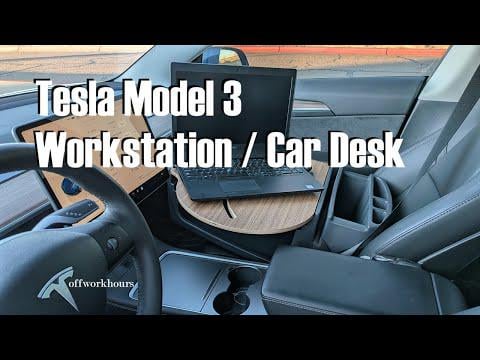
2023 Tesla Model 3 Performance Workstation / Car Desk Setup

drivejumpfly | 2026-01-20 08:23 | 27 views

I did not want a permanent bolted in solution to use a Star Link Mini in the car, so I bought this setup and customized it to match the OEM woodgrain accents.

Comments (10)
Able-Ambition9084 2026-01-20 20:03

Veryyy Nice! Howw much??

Able-Ambition9084 2026-01-20 20:04

![gif](giphy|l0HTYUmU67pLWv1a8)

gentlehurricane 2026-01-21 04:16

Why not just go to a coffee shop instead of doing all this?

drivejumpfly 2026-01-21 07:40

It was about $230 plus labor. More than I wanted to pay, but it fits my use case perfectly.

drivejumpfly 2026-01-21 07:51

Finding and stopping at coffee shops takes too much time. Places to pull over and park are everywhere and Star Link is very reliable.

gentlehurricane 2026-01-21 07:57

How’s the speed, and what are you typically needing an uplink for?

Altruistic-Visual912 2026-01-21 18:16

Do you type often with that setup? If so... Is it comfortable to do so?

drivejumpfly 2026-01-22 01:22

So far 100 - 116 Mbps. Mainly remote destination access and video conferencing.

drivejumpfly 2026-01-22 01:34

I just started using it recently. The laptop can be moved about one foot closer, but I keep it out of the area of the Tesla display while driving just to be safe. I don't type novels on it, so it works well. I won't say it is the best ergonomically but so far I like it. They make another one that extends even further toward the driver but it has too much hardware for me. I recommend using a trackball style mouse with rubber feet with this setup.

cava83 2026-01-29 17:26

Looks lovely but ergonomically wise, not sure that be any good for your back/neck/ anything......

Add comment

Login is required to comment.

Login with Google