DDD_db
2025-12-16 23:50
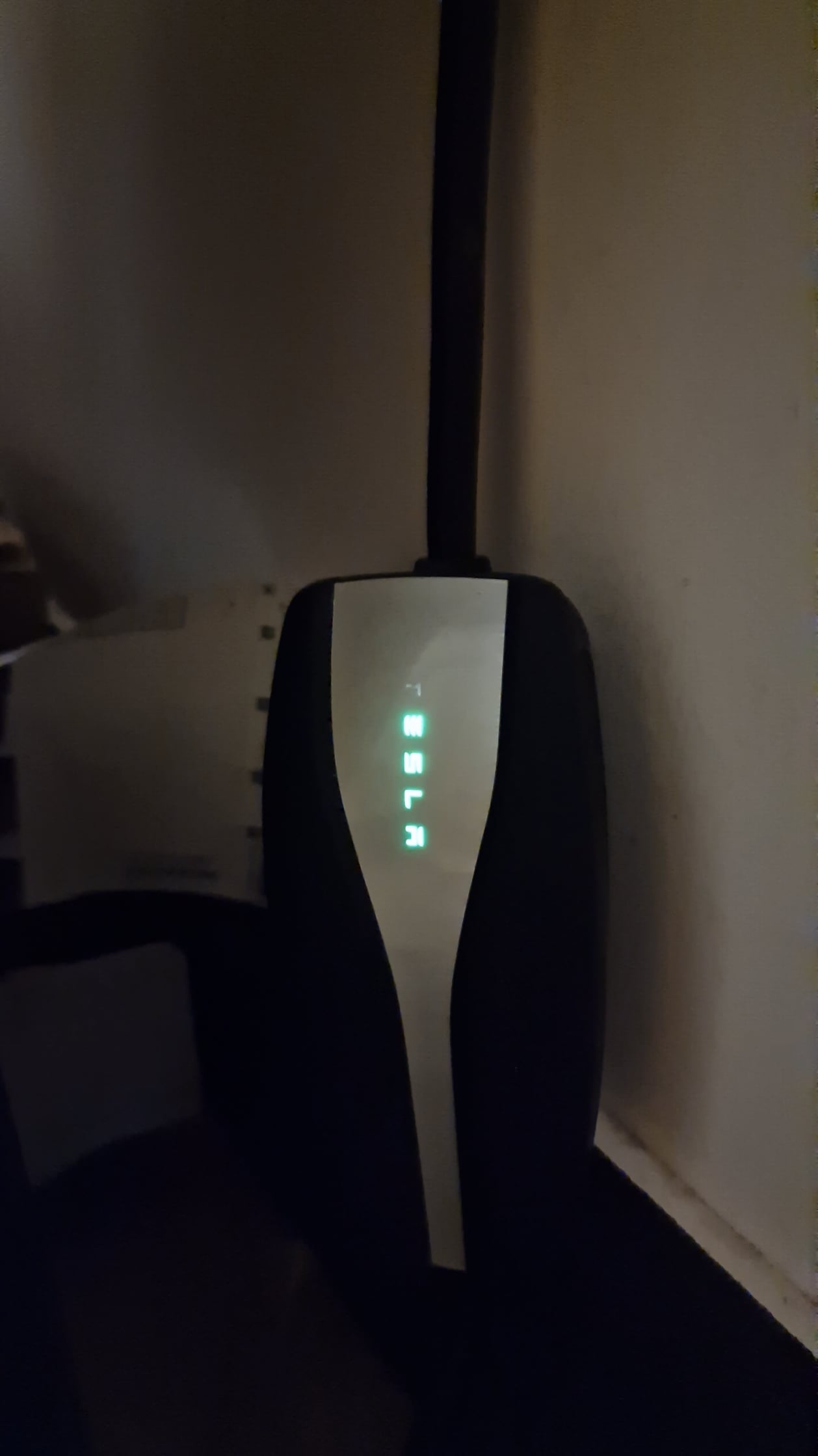
I believe one red flash is a GFCI fault.
Typically caused by lack of continuity between Neutral and Ground.
Rey123x
2025-12-16 23:50
What does the app say when you plug it in?
Reset your car, and the breaker then plug it back in
Scuffedpixels
2025-12-16 23:50
Mine was shot too. Took it to a service center they swapped me out for a new one because my charger was only a month old.
But I also purchased a Lectron Level 1 charger off Amazon while waiting for my service appt (they had me bring the whole car in to troubleshoot 🙄)
But I used the Amazon one until I got a 240v plug installed to use with the new Mobile Charger.
ETA: I ordered a little magnetic charger port hood to cover the plug when my car was parked outside in case the rain had anything to do with it. Works great as the plugs never wet even in downpours, but I don't think my first mobile charger died due to the moisture.
Snoo51352
2025-12-16 23:57
I live in the UK and it's a new built house. I actually use the charge every day tbh but all sudden this has happened..no idea why.
Also when I press the button on the charger head to open my cars charger port it fails to do that...
Snoo51352
2025-12-16 23:58
What breaker the fuse box?
I did reset it by holding town the two buttons on my streeing wheel
Snoo51352
2025-12-16 23:59
Update
Also when I press the button on the charger head to open my cars charger port it fails to do that...
Rey123x
2025-12-17 00:01
Yes the breaker from the electrical panel that goes to that outlet
Or try another outlet indoors as a test to see if you still have that red letter on it.
If you dont, it's likely your main outlet
Snoo51352
2025-12-17 00:06
Very good point I'll check a inside socket tonight, currently sitting at Tesla fast charger
Fogdrog
2025-12-17 00:06
Check to be sure the short cord is pressed firmly into the power supply.
maurymarkowitz
2025-12-17 00:23
Having same problem. Are you getting the GFI warning on your phone? I find pulling the power from the charger and then waiting a bit before you plug it back in resets it.
Snoo51352
2025-12-17 01:09
I am not getting any errors on my phone and the socket doesn't seem to be hot or anything outside is 6 degrees (UK)
So I just unplugged it for the night and see what happens tomorrow. The button on the charger port doesn't work either .. weird
None of fuses have tripped either so no idea what's going on.
Snoo51352
2025-12-17 01:10
Fully pressed in
7ipofmytongue
2025-12-17 01:46
Tesla:
[https://service.tesla.com/docs/Public/diy/model3/en\_us/GUID-A3E92BEC-5A7A-4092-BAAF-A17B8E863B3F.html](https://service.tesla.com/docs/Public/diy/model3/en_us/GUID-A3E92BEC-5A7A-4092-BAAF-A17B8E863B3F.html)
|All on|1 flash|Thermal fault.|Consider charging in a cooler area, such as indoors or in the shade. If the error persists, contact your closest Service Center.All on 1 flash Thermal fault. Consider charging in a cooler area, such as indoors or in theshade. If the error persists, contact your closest Service Center.|
|:-|:-|:-|:-|
That is strange as you are not in hot environment.
This is while plugged into car? Need to get into SERVICE mode and see if there is any errors.
For Battery & Component Temperatures (Advanced)
* **Service Mode:**
1. Go to the **Software** screen on your touchscreen.
2. **Hold your finger** on the Model Name for a few seconds.
3. Enter **service** as the code and tap OK.
4. Navigate to the **High Voltage** \> **Charging** menu to see a battery diagram with min/max temperatures.
(I am Tesla noob but very tech savvy)
Snoo51352
2025-12-17 02:04
You are the best. Let me do it tomorrow and let you know. I did just use the super charger and it was all fine btw.
It should be covered under warranty?
7ipofmytongue
2025-12-17 02:26
If, as there is a slight suspicion, it is an issue with the cars AC to DC inverts, Tesla will replace for free (same with the *home mobile charger*, which is actually a fancy switch).
Also, you can still charge at a Super Charger, it is DC-DC to that goes straight to your battery.
memohallo
2025-12-17 02:28
I was getting the same on mine. Had it swapped and the second one did the same thing. It was heating up too much and pulling too much power and overheating. I don’t trust the mobile charger at all as a result. I eventually had a couple of electricians out to make sure the outlet and everything else was right. I eventually got the standard wall connector and when the electrician was here, we saw my wires were brown due to overheating. Huge fire hazard. Glad I didn’t continue to use the mobile charger.
iLeet1
2025-12-17 03:03
[https://service.tesla.com/docs/Public/diy/model3/en\_us/GUID-A3E92BEC-5A7A-4092-BAAF-A17B8E863B3F.html](https://service.tesla.com/docs/Public/diy/model3/en_us/GUID-A3E92BEC-5A7A-4092-BAAF-A17B8E863B3F.html)
Appears to be a thermal fault? I would reset fuses and if that fails charger may be cooked
Buggabones1
2025-12-17 04:08
Happens to mine randomly like once every 4 months. Same T in “Tesla” flashes orange and gets an error message on app and in car. Unplugging it and plugging it back in fixes it. Never bothered to figure it out since it’s rare.
*unplugging the charger from the outlet and back in fixes it for me
PNWbigring
2025-12-17 04:52
I've used my mobile charger for 6 years now to charge my ?3 (level 2 circuit). After about three years my charger would fault (red "t") and I would get a message about excessive heat (in car) and suggestion to check the receptacle.
Well the receptive was fine and I learned that other users have had an issue where the removable plug adapter actually degrades and causes excess heat.
So you could potentially replace that portion, or in my case Ive just limited my charge rate to 20 amps via the car and it's been fine for multiple years now. Maybe try a reduced charge rate after resetting the charger.
Dense-Sail1008
2025-12-17 04:54
You should also see a message in the car. When I see this it says something like the mobile unit was getting too hot. I have to unplug it and plug it back in to reset it. I usually bump my charging amps down from 32 to 24 (in mobile app) and usually that keeps things cool enough. It does slow down charging a bit tho.
shuacore
2025-12-17 05:02
The charger is detecting a problem with grounding or electrical leakage and is not charging for safety reasons.
⸻
Common causes
• ⚡ Bad or missing ground at the outlet (very common in older homes/garages)
• 🔌 Loose or worn outlet
• 💧 Moisture in the outlet or plug
• 🧱 Faulty extension cord or adapter (Tesla strongly discourages extensions)
• 🧰 Internal issue in the outlet wiring
⸻
What to do (in order)
1. Unplug the Mobile Connector from the wall
2. Wait 30 seconds
3. Plug it directly into the outlet (no extension cords or power strips)
4. Make sure the outlet feels tight and dry
5. Try a different outlet (ideally on a different circuit)
6. If possible, try charging at:
• A public Level 2 charger
• A friend’s house
(This helps confirm whether it’s your outlet or the connector)
lupin0734
2025-12-17 05:51
In my situation this happened One time. Simply stayng plugged the part that is connected to the wall was a bit unplugged. I just plug It correctly back and I hadn't yellow "T" anymore.
izzue66
2025-12-17 06:31
Unplugging and replugging or resetting the breaker works for me.
OaktownCatwoman
2025-12-17 09:18
Just unplug it and plug it back in. I had a mobile charger that always got ground fault errors. Other mobile chargers on the same plug were fine. Sometimes they fail.
maurymarkowitz
2025-12-17 12:20
Mine doesn’t get hot either, just the error. I don’t think k anything is actually wrong, the error generally clears and charging is fine when it turns on in the early morning.
Snoo51352
2025-12-17 14:03
Thank you everyone for your comments and for trying to help. I plug the charger into a wall socket in my garage and run the cable under the garage door. It has been working fine since September. Only the charger head is exposed outside, and it hasn’t been submerged in water or anything like that.
I don’t get any errors apart from the “charging equipment not recognised” message. I’ve left it unplugged for 12 hours, but I still get the same message. The button on the charger also doesn’t work to open the charging port.
Could this be related to a recent update? I hope the Tesla warranty covers it, as the car is still under warranty. I’ve reset the circuit breakers and turned them back on, but nothing has changed.
I’m really out of ideas at this point. I’m thinking of asking my neighbour to try the charger on their Tesla. 🤔
Snoo51352
2025-12-17 14:04
Thank you everyone for your comments and for trying to help. I plug the charger into a wall socket in my garage and run the cable under the garage door. It has been working fine since September. Only the charger head is exposed outside, and it hasn’t been submerged in water or anything like that.
I don’t get any errors apart from the “charging equipment not recognised” message. I’ve left it unplugged for 12 hours, but I still get the same message. The button on the charger also doesn’t work to open the charging port.
Could this be related to a recent update? I hope the Tesla warranty covers it, as the car is still under warranty. I’ve reset the circuit breakers and turned them back on, but nothing has changed.
I’m really out of ideas at this point. I’m thinking of asking my neighbour to try the charger on their Tesla. 🤔
Snoo51352
2025-12-17 14:04
When you say moisture, do you mean in the socket that plugs into the wall or the charger head?
Snoo51352
2025-12-17 14:05
It doesn't get hot I live in a cold weather and there is no signs of burnt out on the socket facing
-ZuprA-
2025-12-17 15:17
I have same symptoms, I noticed that our garrages roof edge was just up in the spot where the cars charging port is. So when it rain it dropd water right onto the handle. Button isnt working anymore, when pushed water came out from the seams. Tried to dry it but it didnt work anymore
tomtendo
2025-12-17 15:23
Try taking it out and blowing on it like a nintendo cartridge
Snoo51352
2025-12-17 16:13
So the charger is goosed? Did you get a new charger?
-ZuprA-
2025-12-17 17:13
Still charges normally, button just doesnt work. Its 2019 so no basic warranty anymore
stratospaly
2025-12-17 17:36
When mine does that it's due to overheating. I just reboot the charger.
Snoo51352
2025-12-17 17:49
It's not overheated. I have disconnected for 12 hours and nothing
Snoo51352
2025-12-17 17:49
How long does the warranty last for
-ZuprA-
2025-12-17 18:48
4y
Legitimate-Star8570
2025-12-17 20:55
Mine started doing this, then it started working off and on.
I ended up getting another charger but from ebay, cost me about £90 rather than another tesla one and it’s never been an issue.
I’ve heard a lot of tesla charger stop working after a while.
Consistent-Amoeba505
2025-12-17 21:12
Mine had the same issue in the past and it wasn't fully pressed in
shuacore
2025-12-17 22:30
It shouldn’t be the port into the Tesla. That area is made to charge in rain and snow
Snoo51352
2025-12-18 01:43
Maybe if I take it to Tesla as the car is still under warranty?
Snoo51352
2025-12-18 10:36
Perfect I have raised a ticket with Tesla on my app let's see
Snoo51352
2025-12-18 13:25
I have raised the ticket but I cannot see the status of my service ticket on the mobile app any suggestions?