← Back to topic list

Sealion 7 how do I turn off daytime lights?

MHTSAPAS | 2025-10-29 08:06 | 25 views

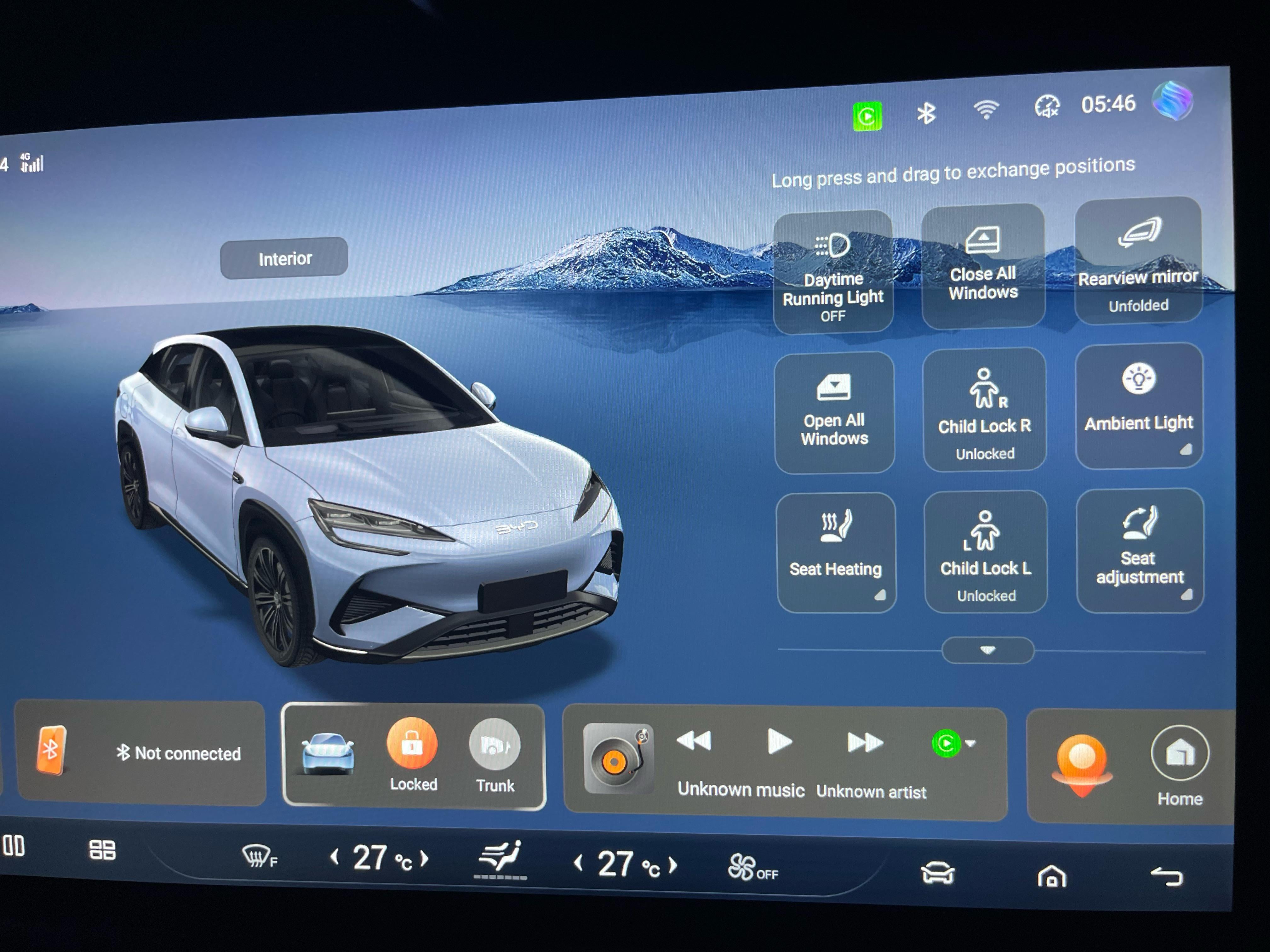
With the release of firmware 3.0, apparently we can switch off the daytime driving lights from the “PAD” while the vehicle is in park. I cannot find any reference to a “PAD” and therefore ask if anyone knows how to do this? Also, how do you guys close the trunk from inside the vehicle? The door button only seems to open it and I thought there would be another way than removing the fob from my pocket and double clicking to close.
Comments (8)
Fuzzy-Satisfaction37 2025-10-29 08:24

Hold the boot switch in the door to close it.

MHTSAPAS 2025-10-29 08:43

Thanks mate! Guess who feels bloody stupid? Hehe

va-va-voom-14 2025-10-29 08:46

Pretty sure the daytime lights will be via the home screen (desktop) touch the car symbol towards the right hand of the bottom and then there are a few different options including lighting around those menus.

jimmyliew 2025-10-29 09:19

You can also set the boot opening/closing shortcut when you swipe down from the main screen.

Fuzzy-Satisfaction37 2025-10-29 10:14

All good. Don’t feel bad someone had to show me too.

[deleted] 2025-10-29 10:21

[deleted]

MHTSAPAS 2025-10-29 10:34

The button in the screen just acts like it’s trying to open it again. I haven’t tried with the 3.0 update however. It just came to mind and although I rarely open the boot, I was interested to find out. Hope the update comes soon for you mate. No real difference besides the HUD navigation that I’ve really used but we will see as time goes by.

MHTSAPAS 2025-10-29 18:46

https://preview.redd.it/l4fn3fknj3yf1.jpeg?width=4032&format=pjpg&auto=webp&s=cf1dd9423c86facfbd0faafeabaf847ec157a1a9 Thanks to Drew\_555 for this!

Add comment

Login is required to comment.

Login with Google